A strong message can still feel awkward on camera if the script is hard to read. That is why teleprompter script format matters.
The right format helps you stay on pace, keep your place, and sound more natural while recording. It also makes the script easier to scan at a glance, which matters when you are speaking and reading at the same time.
A teleprompter-friendly script is not only about what you say. It is also about how the words appear on screen. Long paragraphs, cramped spacing, and stiff phrasing can slow you down and make delivery feel forced. A cleaner layout gives you more control over pacing, emphasis, and eye contact.
In this guide, you’ll learn how to format a teleprompter script for easy reading and smoother delivery. We’ll cover sentence length, readability, timing, spacing, line breaks in teleprompter scripts, and the mistakes that often make a good script harder to perform.
Teleprompter script format is the way a script is arranged on screen so it is easy to read while speaking. It includes sentence length, paragraph size, spacing, punctuation, visual grouping, and other choices that make delivery smoother.
This is different from writing a script from scratch. Writing is about shaping the message. Formatting is about making that message easy to read in real time.
A script may look fine in a document and still perform poorly in a teleprompter. Dense paragraphs, long sentences, and overly formal wording tend to create friction. You are more likely to lose your place, rush through a point, or sound like you are reading.
A well-formatted teleprompter script does the opposite. It helps you scan quickly, pause naturally, and stay focused on the camera instead of fighting the layout.
Timing matters too. A script that feels fine on the page can still run long when spoken aloud. If you want to estimate delivery time based on your natural pace, a Speaking Speed Calculator can help you gauge your words per minute before you record.

Good formatting helps you read with less effort. That changes how you sound on camera.
When the text is easier to follow, you can spend more attention on delivery. Your pace feels steadier. Your tone sounds more relaxed. Your eyes stay closer to the lens. Those small improvements often make the final video feel more polished.
Good format can also help you:
Short sentences are easier to read and easier to say out loud. They also sound more natural on camera.
If a sentence contains multiple ideas, split it. A teleprompter script works best when each sentence carries one clear point. That keeps your delivery steady and helps your audience follow along without strain.
Instead of writing one long, layered sentence, break it into smaller parts that sound like real speech.
For example:
Welcome, everyone. Today, I want to talk about the importance of collaboration in modern teams.
That reads more cleanly than packing the full thought into one long sentence.
Line breaks matter more than many people expect. They help your eyes track the script and make it easier to pause at the right moment.
Do not treat your teleprompter script like an essay. A wall of text may be fine on paper, but it becomes harder to scan during delivery. Break longer thoughts into shorter visual groups.
Try formatting like this:
Welcome, everyone.
Today, I want to talk about
the importance of collaboration
in modern teams.
This layout gives you clearer visual cues and supports a more natural rhythm. Strong script formatting for teleprompter use often depends on small changes like these.
Short paragraphs create breathing room on screen. They help your eyes reset and make the script feel lighter.
A good rule is to keep each paragraph focused on one thought or one beat. When you move to a new point, start a new paragraph. This works especially well for tutorials, speeches, presentations, and training videos.
Your script should feel easy to read from a comfortable distance. If the text looks cramped, your delivery often becomes cramped too.
Use a teleprompter font size that feels clear right away. Give the lines enough spacing so they do not blur together. Teleprompter.com supports live font size changes, line spacing adjustments, margins, text alignment, and speed-based scrolling across supported platforms, which makes these formatting choices easier to test during rehearsal and recording.
Formatting and display settings work together. A good script layout gives you a solid base. The app settings help you fine-tune the reading experience.
A teleprompter script should sound spoken, not overly polished.
Many scripts become hard to read because they are written like articles or formal reports. On camera, that kind of wording often feels stiff. Shorter phrasing, simpler vocabulary, and natural transitions usually perform better. One useful step is to turn rough ideas into clear, speech-ready paragraphs using an AI paragraph tool for script writing, then refine them for tone, rhythm, and delivery.
As Gary Schmidt, Past International President of Toastmasters, put it, “A key to successful speechwriting is writing for the ear.” That idea applies directly to teleprompter scripts. If a line looks fine on the page but sounds awkward out loud, it needs revision.
Read each section aloud as you write. If a sentence sounds odd when spoken, revise it. If a phrase feels too formal, simplify it. A teleprompter script works best when it sounds like something a real person would actually say on camera.
A few cues can help. Too many can clutter the screen.
Use simple markers only where they support delivery, such as:
[pause]
[slow down]
[emphasize]
These notes can be useful for speeches, training videos, and scripted presentations. Keep them light. The goal is to guide delivery, not overload the script.
Some scripts look fine until you reach the parts that are easy to trip over. That usually includes names, technical terms, product names, or large numbers.
Rewrite those sections so they are easier to read aloud. Spell out pronunciations if needed. Break up long numbers. Replace awkward phrases with simpler wording.
A teleprompter script should support performance, not test your reflexes.
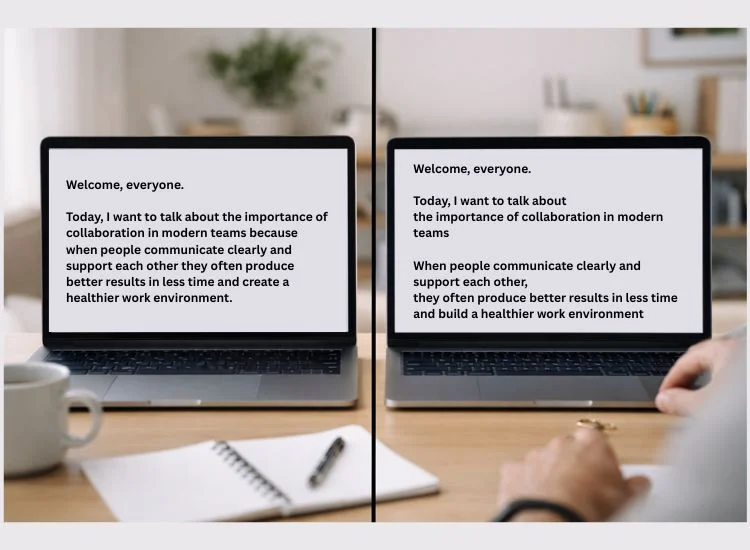
Here is a simple example that shows how formatting changes the reading experience.
The second version is easier to scan, easier to pace, and easier to deliver with confidence. The message is the same. The format does the heavy lifting.
A teleprompter script template can save time because it gives you a repeatable structure before you start polishing each line. That is especially useful if you create recurring content such as YouTube videos, educational lessons, internal updates, product demos, or talking-head explainers.
A simple template can include:
The template does not need to be fancy. It just needs to keep the layout consistent so your scripts stay easy to read.
A script can be strong in theory and still create problems during recording. Most formatting issues show up in the same places, and they affect pacing, clarity, and confidence more than people expect.
Large paragraphs slow you down because your eyes have more to process at once. They also make it harder to recover if you lose your place.
Break text into smaller sections before you record. This is one of the fastest ways to make a script feel easier to read.
Long sentences often sound smoother in your head than they do out loud. On a teleprompter, they can make you rush, flatten your tone, or run out of breath before the sentence lands.
When a sentence starts stacking multiple clauses, cut it in half. Clean structure leads to cleaner delivery.
A script written like an article often includes phrases that are grammatically fine but awkward to say. That creates friction on camera.
Write for speech. Use natural phrasing. Read it aloud. Revise anything that sounds too formal, too packed, or too stiff.
A script may be readable and still be the wrong length. If it runs too long, you start cutting on the fly. If it runs too short, the delivery can feel rushed or underdeveloped.
It helps to check timing early instead of waiting until recording day. Teleprompter.com’s Script Timer can help you estimate reading time before you record, which makes it easier to adjust pacing while you are still editing.
Many people review a script silently and assume it is ready. That usually misses the sections that feel awkward when spoken aloud.
Read the full script in teleprompter view before recording. Pay attention to where you rush, pause awkwardly, or lose your place. Those moments usually point to formatting issues you can fix quickly.
A clean format helps, but it does not replace rehearsal. Even a strong script benefits from one or two practice reads before the camera starts rolling.
Each read-through gives you a chance to smooth out phrasing, adjust pacing, and make the script feel more natural on screen.

Open the script in your teleprompter and read it aloud at a comfortable pace. Pay close attention to the places where your delivery changes.
Look for moments where:
Then revise based on what happens during the read, not just on what looks clean in the document.

Formatting a script is easier when you can see how it behaves during delivery. That is one of the main benefits of using Teleprompter.com. Instead of guessing if a paragraph is too long or if a sentence feels crowded, you can review the script in a teleprompter setting and adjust it based on how it reads in real time.
That matters because script formatting is not only a writing task. It is also a delivery task. A line that looks fine in a document can feel too long once you start speaking. A paragraph that seems clear on the page can feel too dense when you are trying to stay relaxed on camera.
Using Teleprompter.com while formatting your script can help you:
This approach adds value because you are not editing in isolation. You are formatting with performance in mind. That helps you create a script that is easier to follow, easier to deliver, and easier to refine before recording.
Teleprompter.com can be especially helpful for people who record often, including:
When your script format is easier to follow, you can spend more attention on:
If you want a simple way to format, refine, and practice scripts in one place, Teleprompter.com is a practical option. You can sign up and test how your script feels on screen before you record the final version.
Before you record, check the following:
These are simple teleprompter script format guidelines, but they can make a noticeable difference in delivery. Once the text is easy to read, you can focus more on tone, timing, and connection.
A polished video or presentation starts with a script that is easy to read under pressure. Good teleprompter formatting helps you shape text for real delivery, not just for the page.
Short sentences, clear spacing, natural phrasing, and smart line breaks make it easier to stay on pace, maintain eye contact, and sound more like yourself on camera. A few small changes to layout often improve the final result more than people expect.
Before you record, test the script in a real teleprompter view and adjust anything that slows you down. If you want one place to time, practice, refine, and record, Teleprompter.com brings those steps together with its teleprompter platform and creator tools.
Use short sentences, short paragraphs, readable spacing, and clear visual breaks between ideas. Good teleprompter formatting also includes natural phrasing, easy-to-read font settings, and line breaks that match how you speak.
The best teleprompter font size is the one you can read comfortably from your recording distance without squinting or rushing. Teleprompter.com lets users adjust font size live on supported platforms, which makes it easier to test what feels readable before recording.
Line breaks make long thoughts easier to follow and help speakers pause more naturally. They reduce visual clutter, support smoother pacing, and make it easier to recover if you lose your place during recording.
A teleprompter script template can save time because it gives you a clean starting structure for paragraph length, spacing, and delivery flow. It is especially useful for repeatable formats like tutorials, presentations, training videos, and recurring social content.
Good teleprompter script format guidelines include short sentences, short paragraphs, readable font size, generous spacing, natural wording, and clear visual separation between ideas. The goal is to make the script easy to read out loud, not just easy to read silently.


.png)


.png)