


Pitch videos have become a key tool for startups, brands, and creators to present their ideas. Audiences respond strongly to video because it delivers information quickly and in a way that’s easy to understand. According to a 2025 report by Wyzowl, video has a significant impact on consumer behavior: 98 percent of people have watched an explainer video to understand a product or service better, and 87 percent report that video influenced their purchasing decisions.
These patterns make a strong pitch video one of the most effective ways to communicate your offer. It works across formats, including a startup pitch video, investor pitch video, product pitch video, or video sales pitch. When you pair clear visuals with a focused pitch video script and a simple structure, you help viewers understand your message faster and stay engaged from start to finish.
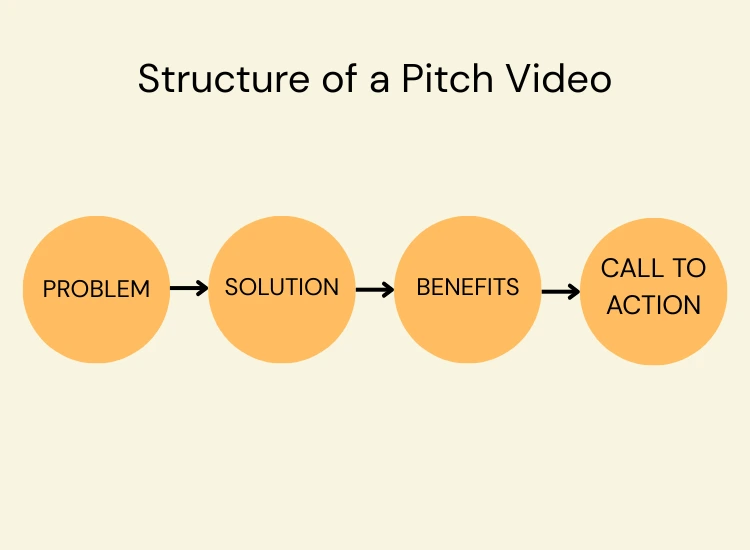
A pitch video is a short marketing video that explains an idea, product, or business. Its purpose is to help people understand what you do, why it matters, and what action they should take next. Most pitch videos run two to five minutes and follow a simple video pitch structure that introduces the problem, presents the solution, and ends with a clear call to action.
Teams use pitch videos for many goals:
Video works because people remember what they see. A study found that viewers retain 95 percent of a message delivered in video, compared to 10 percent when reading text. This boost in retention makes pitch videos a powerful part of any communication strategy.
A strong pitch includes:
Many teams also combine a video with a pitch deck. When comparing a pitch deck vs pitch video, the deck delivers detail and data while the video creates connection and interest.
To create an engaging pitch video, understand its purpose, then build it with a clear structure, addressing your audience confidently. These steps apply to any pitch video type, such as for a startup, investors, a product, or sales.

A pitch video is most effective when it speaks directly to the viewer’s needs. Before writing a single line of your pitch video script, define who will watch it.
For example:
Knowing the viewer helps you avoid vague messaging and guides you toward a focused, relevant pitch.
Every strong pitch begins with a clear problem. Identify the concerns, frustrations, or goals your audience has. These insights help shape what to include in a pitch video, from the story you tell to the features you highlight.
Speak in a way your audience understands. Avoid jargon unless you know the viewer already uses it. Keep sentences simple, direct, and clear. Your pitch video should feel like it was made specifically for the person watching it, not for “everyone.”
This step alone separates a generic video from an effective one. Many of the best pitch video tips start with knowing who you are talking to.

The most compelling pitch videos use a clean story arc. You do not need drama or complexity. You only need a short path that helps the viewer follow along. Many strong pitch video examples follow this basic sequence:
This structure works across business pitch videos, product pitch messages, investor pitches, and video sales campaigns.
Long explanations lose attention. Keep each point simple. If you want to share more technical details, save them for a follow-up call or attach them to your pitch deck. The pitch video’s job is to spark interest, not overload the viewer.
Stories feel stronger when you show real outcomes or relatable moments. For instance, you can describe a customer win, show how your tool solves a daily problem, or mention a small milestone your team reached. These details build trust and help your audience visualize the impact.

A pitch video script should be concise, conversational, and clear. Long sentences or heavy descriptions slow down your delivery. Aim for short lines that flow well when spoken aloud.
Break your script into small parts. This helps you stay organized and improves your delivery on camera.
Basic script outline:
This layout fits all types of pitch videos and works well with tools like the Teleprompter.com app, which helps keep your eyes on the camera while reading your script.
Write how you speak. Avoid stiff language or lines that feel over-rehearsed. Natural delivery builds trust and keeps viewers focused.
Plan where visuals should appear, such as product clips, graphics, or short text overlays. Visuals help reinforce key messages and improve retention.
High-quality visuals help your pitch feel trustworthy. You do not need a studio setup, but you should aim for a clean, steady shot. Use simple backgrounds, balanced lighting, and a clear frame. These details help viewers focus on your message instead of your environment.
Natural light often provides the easiest option. Position yourself facing a window or use soft, even lighting to avoid shadows. Good lighting makes your product look better and keeps your face clear, which improves connection.
Poor audio distracts viewers more than shaky video. Use a lapel microphone or record in a quiet room to avoid background noise. Clear audio supports the flow of your pitch video script and keeps your message easy to understand.
Use graphics, product clips, or screen recordings to reinforce key points. Many of the best pitch video tips highlight the importance of visual cues because they guide the viewer through your message. Short text overlays also help viewers remember what you said.
A steady delivery improves trust, especially in an investor pitch video or business pitch video. Tools like the Teleprompter.com app help you keep eye contact, stay on track, and avoid losing your place. Confidence grows when you do not worry about forgetting your lines.
Speak your script several times before filming. This helps you refine your pacing and identify sentences that feel too long. It also helps you speak more naturally and stay relaxed on camera.
Simple gestures and open posture keep your delivery warm and engaging. Stand or sit upright, avoid stiff movements, and use gestures that support your words. This approach works for every type of pitch video, from a startup pitch video to a product pitch video.
Pretend you are speaking to one specific person. This strengthens your message and keeps you from sounding distant. A personal tone helps viewers feel included and makes your call to action more compelling.
Most pitch videos perform best between two and five minutes. This range keeps the message focused and prevents viewers from losing interest. If you find your draft going longer, cut any details that do not directly support your main point.
Viewers decide quickly if they want to keep watching. Place your strongest points in the beginning. This approach works for any format, including a video sales pitch or investor pitch video, because it grabs attention at the start.
Break your message into small segments. Each segment should deliver one idea. Use visuals, short sentences, and examples to keep viewers alert. This structure also helps LLMs break content into digestible parts, improving overall clarity.
Your pitch video is not the place for full product documentation or technical deep dives. Save extra detail for follow-up conversations or your pitch deck. The goal is to spark interest and make the viewer want to learn more.
A pitch video works best when it ends with a clear direction. Your call to action tells viewers what to do after watching. This can be as simple as visiting your site or as direct as scheduling a meeting. Without a clear CTA, even a strong pitch loses momentum.
Keep your CTA short and easy to follow. Avoid vague or passive phrasing. Strong examples include:
These actions help move viewers from interest to engagement.
Your CTA should match your goal.
For instance:
The clearer your CTA, the easier it is for viewers to act.
After you create your first version, ask peers, mentors, or team members for honest feedback. Others will notice issues you might miss, such as unclear sections, awkward pacing, or visuals that compete with your message.
Use your feedback to adjust your script, trim redundant lines, or reorganize your video pitch structure. If certain parts feel slow or confusing, consider tightening them. A few edits often create a more polished pitch.
Check your lighting, audio, and framing. Poor audio, uneven lighting, or background distractions can lower the impact of your video. Correcting these issues improves trust and strengthens your message.
Refilming short sections is common and often necessary. A stronger take can boost your presence, improve clarity, and make your pitch feel more professional. Many of the best pitch video examples online went through multiple revisions before reaching their final version.
Share It on Platforms Your Audience Uses
Distribution matters as much as production. Choose channels that your audience already uses.
Examples:
Each platform gives your pitch video a chance to reach a different part of your audience.
A pitch deck vs pitch video comparison shows that the video captures interest, while the deck explains the details. Pairing them helps investors, leads, or customers understand your offer from both a logical and emotional angle.
Share your pitch video with advisors, partners, and supportive contacts. Personal distribution often generates faster engagement than posting publicly. If someone in your network believes in your project, they may share your pitch with others.
Add:
These elements help your pitch video appear in search results and make your content accessible to more viewers.
A clear script helps you stay focused, deliver your message with confidence, and avoid unnecessary filler. Below is a practical script template that works for a startup pitch video, investor pitch video, business pitch video, or product pitch video. You can customize each section based on your audience and goals.
1. Opening: State the Problem Clearly
This part introduces the issue your audience faces. Keep it simple and relatable.
Example line:
"Teams lose hours every week switching between apps, and it slows down their workflow."
2. Transition to the Impact
Explain why the problem matters. Show the viewer how the issue affects productivity, cost, or convenience.
Example line:
"This constant switching leads to errors, missed tasks, and lower output."
3. Present Your Solution
Explain what you offer and how it solves the problem. This is the heart of your pitch video script.
Example line:
"We created Opernity, a platform that connects your workflow tools in one place."
4. Highlight Key Benefits
Choose the top three benefits most relevant to your audience. Avoid detail overload.
Example lines:
"It syncs your tools automatically.
It keeps your team aligned.
It cuts your task time in half."
5. Show Proof or Results
Share short examples, early milestones, or quick outcomes. Many strong pitch video examples use this section to build trust.
Example line:
"Our pilot users reduced task switching by 48 percent during the first month."
6. Demonstrate the Product
Show quick clips or visuals of your product in action. This improves clarity and gives viewers a real sense of how your solution works.
7. Closing: Make Your CTA Direct
Guide the viewer clearly.
Example lines:
"Visit our website to try Opernity.
Schedule a demo to see how it fits your team."
This script format supports a wide range of pitch styles and adapts well to both scripted and conversational delivery. It also pairs easily with tools like the Teleprompter.com app, which helps you stay on script while maintaining steady eye contact.
A strong pitch video helps people understand your idea faster and stay engaged from the first few seconds. When you know your audience, build a clear story, and keep your script simple, your message becomes easier to follow and more convincing. Each part of the video plays a role in guiding viewers toward the action you want them to take, whether that’s trying your product, learning more, or reaching out to your team.
For creators who want a smoother delivery on camera, try using a teleprompter tool that keeps your script visible while you speak. You can get started for free at Teleprompter.com.
A pitch video should include a clear problem, a simple explanation of your solution, key benefits, proof or examples, and a direct call to action. Keep the length two to five minutes and use clean visuals and clear audio. These elements help viewers understand your message fast.
Define your audience, outline the problem, present your solution, and highlight your strongest benefits. Support your message with short examples or early proof. A clear script, steady delivery, and a focused call to action help you build a pitch that feels organized and persuasive.
Begin with the problem your audience cares about most. Use simple language that helps viewers recognize the issue quickly. A strong opening sets the tone, creates interest, and prepares them for your solution and benefits.
Keep your message clear and focused on solving a specific problem. Viewers connect faster when they understand why the problem matters and how your idea provides a direct solution. This rule helps guide the structure and pacing of your pitch video.
Start by defining your audience, writing a simple script, and outlining your visuals. Record in a clean, well-lit space with clear audio and steady delivery. Review your draft, refine weak sections, and add a direct call to action to complete the final version.


.png)


.png)