REMOTE CONTROL · ANY DEVICE

Control your teleprompter from any device, even a browser

Phone, tablet, apple watch, or any web browser: start, stop, edit, and preview from across the room or across the world. It even turns a second device into another teleprompter display, something no other teleprompter app does.

100K+ five-star reviews

WHAT REMOTE CONTROL DOES

Teleprompter.com's remote control turns any second device (iPhone, iPad, android, apple watch, or any web browser) into a full remote for your teleprompter. It automatically uses the most reliable connection available: bluetooth when there is no internet, your local network when devices share wi-fi, or the internet from anywhere in the world. From the remote you can start and stop scrolling, open scripts, make live edits, and preview exactly what is on the prompting device. The remote can also act as a second display, mirroring the script with zero latency, so one account can run two synchronized teleprompters at once. No other major teleprompter app offers this.

Any browser
No app to install
BT · Wi-Fi · Internet
Auto-selected
Live script edits
From the remote
Second display
Zero latency
Apple Watch
Since day one
NO PROPRIETARY HARDWARE

Any device is a remote

No proprietary hardware to buy. Grab whatever is nearby (a phone, a tablet, an apple watch on your wrist, or a laptop browser), sign in, and you are controlling the prompter. The camera operator, producer, or the speaker themselves can hold the controls.


smartphone icon
Phone
iPhone or Android
tablet icon
Tablet
iPad, in hand or rig
apple watch icon
Apple Watch
Playback from the wrist
monitor icon
Any browser
Laptop or desktop
bluetooth icon
Bluetooth

No internet on location
wifi small icon
Wi-Fi

Devices on the same network
world wide web icon
Internet

From anywhere in the world
ZERO CONFIGURATION

It always finds a way to connect

The remote automatically picks the most reliable link available. No internet on location? It works over bluetooth. Same wi-fi network? It uses that. Different city? It connects over the internet. You never configure anything. It just connects.

FULL CONTROL

More than play and pause

From the remote you can open any script in your library, make live edits that appear instantly on the prompter, adjust playback, and preview what the prompting device is showing, without ever walking over to the rig. (the apple watch acts as a playback remote.)
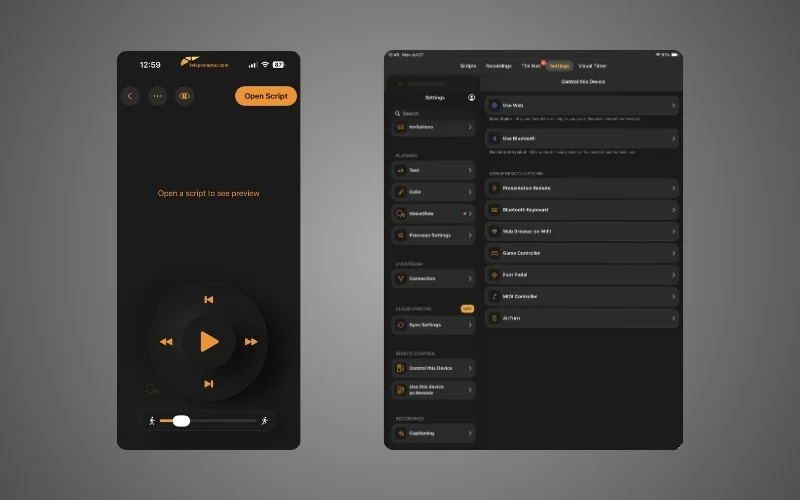
teleprompter remote control options
CAMERA RIG PROMPTER
The same LINE, in perfect sync.
Zero latency
PODIUM CONFIDENCE MONITOR
The same LINE, in perfect sync.
One account, two synchronized teleprompters
NOBODY ELSE DOES THIS

Turn the remote into a second teleprompter

Flip the remote into display mode and it mirrors your script with zero latency. Run a prompter on the camera rig and a confidence monitor at the podium, or give two presenters their own synchronized screens, all from a single account. No other major teleprompter app can do this.

BRING YOUR OWN CONTROLS

Your hardware still works

Prefer physical controls? Bluetooth keyboards, presentation remotes, foot pedals, game controllers, and MIDI controllers all work exactly as before, with customizable shortcuts.

keyboard icon
Bluetooth keyboard
remote control icon
Presentation remote
foot pedal icon
Foot pedal
game controller icon
Game controller
midi-controller icon
MIDI controller

All with customizable shortcuts.

Free to hold, Pro to command

Hold a device as a remote Free

Using any phone, tablet, watch, or browser as a remote is free.

Command a prompter Pro, from $7.50/mo

Remotely controlling a prompting device is part of Pro (billed yearly), covering iOS, Android, macOS, and Web on one subscription.
QUESTIONS

Remote Control FAQs

Which devices can I use as a remote?
Any iPhone, iPad, Android device, Apple Watch, or any web browser on a laptop or desktop. Bluetooth keyboards, presentation remotes, foot pedals, game controllers, and MIDI controllers are also supported.
Does the remote work without internet?
Yes. The remote automatically connects over Bluetooth when there is no internet, over your local network when devices share Wi-Fi, or over the internet from anywhere.
Can I edit scripts from the remote?
Yes. Open scripts, make live edits, and preview what is showing on the prompting device. Changes appear instantly, without touching the rig.
Can I run two teleprompter displays at once?
Yes. The remote can act as a second display, mirroring your script with zero latency. It is a dual-prompter setup no other major teleprompter app offers.
Is Remote Control free?
Acting as a remote is free on any device. Remotely controlling a prompter is included in Pro, from $7.50/month billed yearly.
Can I control the teleprompter from my Apple Watch?
Yes. The Apple Watch works as a playback remote: start, stop, and control scrolling from your wrist.

Put the controls anywhere

Pair a second device in seconds.

Since 2018 we’ve helped 1M+ creators smoothly record 17,000,000+ videos