

If your teleprompter delivery sounds stiff, it’s usually not your voice. It’s your pace.
Most people try to fix this by “speaking more confidently.” But the real fix is simpler: use script speed tips for teleprompter delivery that match how you naturally talk—then format your script so your eyes and voice stay relaxed.
This guide breaks down teleprompter pacing, ideal reading speed, and real ways to stop rushing, dragging, or sounding like you’re reading. You’ll also get step-by-step speed settings, script formatting tricks, and practice methods you can use today.
You can have a strong script and still lose the audience if your pace feels off.
When your teleprompter scroll speed is too fast, you tend to:
When it’s too slow, you pause in strange places, your delivery feels heavy, and your energy drops. The right pace keeps you calm, focused, and natural.
People don’t usually think, “This person is reading too fast.” They feel it as:
That’s why dialing in your pace is one of the most effective tips, especially for creators, educators, coaches, and professionals making on-camera content.
Here’s the baseline: most people speak at around 125–150 words per minute, depending on their natural pace and the complexity of their script.
That said, your best teleprompter pacing depends on your content style, your voice, and your goal. If your script includes pauses for emphasis, storytelling, or audience connection, your pace will naturally land closer to the lower end of that range.
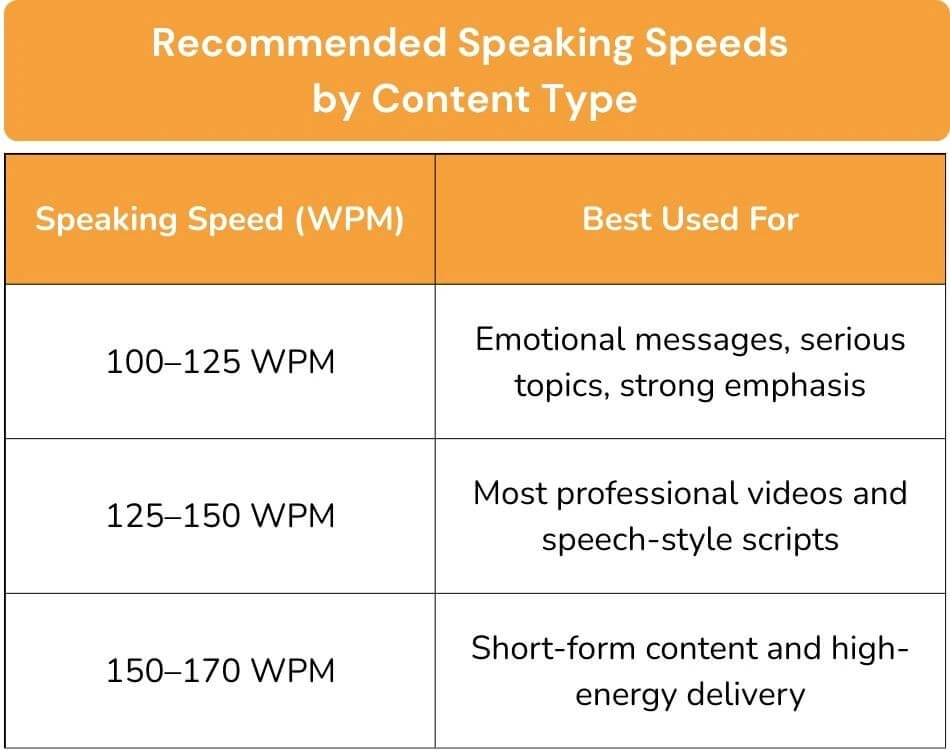
Use these ranges as starting points:
Want a simple timing check? A five-minute delivery at an average pace often lands around 625 - 750 words, depending on how often you pause.
That range is a helpful benchmark, but your natural pace matters more than a fixed number.
Use these as quick reference points:
These script speed tips for teleprompter delivery don’t require fancy equipment, just better setup and better script structure.
Most people speed up as soon as they hit record. Nervous energy makes you rush, even if your scroll speed is “correct.”
So start with your speed set 5–10% slower than what feels right at first. By the time you warm up, it will land closer to your natural pace.
Don’t force yourself to match the teleprompter. Match the teleprompter to you.
Try this fast method:
This is one of the most overlooked tips for teleprompter delivery, and it’s why many people feel stuck; they never calibrate their speed based on real speech. It's also one of the first things worth checking when you're choosing the right teleprompter app in the first place, not every app makes scroll speed this easy to fine-tune.
A teleprompter script should guide speech, not create pressure.
Add natural pauses using:
Example:
Before:
“Today we’re going to talk about how to improve your delivery so you sound confident and natural on camera without looking like you’re reading.”
After:
“Today, we’re going to talk about delivery — so you sound confident on camera.
Natural. Clear. And not like you’re reading.”
Long blocks of text force your brain into “reading mode.” That leads to faster, flatter delivery.
Instead:
Short lines help your eyes track smoothly and make your pacing feel conversational.
Great speakers don’t talk at one speed. They shape the rhythm.
Slow down before:
If you do nothing else, do this. It instantly improves flow and makes your message easier to absorb.

When people ask for the “perfect” teleprompter speed, what they really want is consistency.
Here’s a practical system you can repeat every time.
Pick a range based on your script type:
Remember: you can adjust once you test. Don’t overthink the first setting.
Record yourself reading the first part of your script.
Then check:
This is where most script speed tips for teleprompter delivery become obvious. Watching yourself even once reveals more than guessing ever will.
If you want a faster way to confirm your pace, use the speaking speed calculator to measure your words per minute and set a better starting scroll speed before your next take.
Avoid huge changes. Instead:
Your goal: the teleprompter should feel like it disappears.
Transitions are where pacing falls apart.
Practice:
This is where great teleprompter pacing happens, because your brain stays calm when you already know the rhythm.
If your intro still feels rushed or awkward, this guide to starting a speech strong can help you build a better opening rhythm. And if you're recording multiple takes back-to-back, pace consistency becomes even more important, see these tips on reducing teleprompter reading fatigue during long sessions to keep your energy steady from the first take to the last.
Even with good speed settings, these issues show up often. Use these quick fixes.
Try these fixes:
Fast reading often comes from tension. Breathing resets everything.
Slow doesn’t have to mean boring.
Fix it by:
You can keep a calm speed and still sound engaging.
This is usually a formatting issue.
Fix it by:
This is a common on-camera giveaway.
Fix it by:
The best speed for teleprompter delivery always protects eye tracking first, because viewers trust eye contact. For a deeper breakdown of on-camera technique, read these eye contact tips for videos to make your delivery feel even more natural.
Speed is only half the equation. Formatting controls rhythm.
Most scripts fail because they sound like articles.
Use:
If you wouldn’t say it out loud, don’t write it in your script.
A natural script has texture:
Example rhythm:
This feels strange at first, but it works.
Add cues like:
These cues remind you to act like a speaker—not a reader.
You can’t “think” your way into better pacing. You need repetition.
Here are three drills that work fast.
Read your script like you’re sending a casual voice message.
This makes your tone:
It’s one of the simplest script speed tips for teleprompter delivery because it forces natural cadence.
Your first take is rarely your best.
Record the first take as a warm-up. Then reset and record again. By take two or three, most people sound dramatically more natural because their nervous systems have relaxed.
And if your pacing sounds good but your voice still feels weak on playback, these microphone setup tips can help your audio sound clearer right away.
Read the same paragraph:
Your natural pace becomes clearer when you feel the extremes.

Goal: clarity and confidence.
Goal: understanding and retention.
Goal: trust and authority.
Goal: energy without chaos.
A natural teleprompter delivery comes down to pacing you can maintain. When your script speed matches how you actually speak, everything feels easier. Your voice stays steady. Your phrasing sounds conversational. Your eye contact looks calmer on camera.
The goal is simple: keep your delivery smooth enough that your audience focuses on your message—not your reading.
Quick recap:
Good pacing is a skill, and like any skill, it gets sharper with repetition. Whether you're using an online teleprompter for the first time or refining a delivery style you've been building for years, small adjustments made consistently are what separate stiff, rushed recordings from content that actually holds attention.
Ready to put it into practice? Try Teleprompter.com and test your ideal speed in a few minutes.
Most people speak at around 125–150 WPM, depending on their natural pace and the complexity of their script. If your video includes pauses for emphasis, storytelling, or clarity, your ideal teleprompter pacing may sit closer to 100–125 WPM.
Robotic delivery usually comes from reading too fast, using long sentences, and skipping pauses. These script speed tips for teleprompter delivery work best when you format the script for speech and add breath breaks.
Slow your scroll speed by 5–10%, increase font size, and break your script into shorter lines. Then practice with a warm-up take so your natural speaking rhythm returns.
Adjust the speed first so the teleprompter matches your pace. Then edit the script for natural delivery by shortening sentences and adding clear pauses.
Record a 30-second test at your baseline setting and listen for tension. The best script speed tips for teleprompter delivery always include testing because your natural speaking rate is unique.


.png)


.png)