

You're three minutes into your webinar. Your voice is rushing. You've lost your place. And you just said "um" for the fifth time. Sound familiar?
Sounding confident on webinars is a skill, and like any skill, it can be learned. This guide covers exactly how to sound confident on webinars, from your technical setup to your vocal delivery, so your audience hears authority, not anxiety.
Webinar confidence directly affects whether your audience trusts you, stays engaged, and takes action on what you say.
A significant 85% of businesses now consider webinars essential to their marketing and communication strategy, making strong virtual presentation skills a mainstream professional requirement, not a niche one (DemandSage, 2025).
And the bar for delivery is higher than most presenters realize. Research published in the Journal of Nonverbal Behavior found that vocal properties, including speaking rate, pitch variation, and intensity directly shape how confident a speaker is perceived to be, before the audience has even processed the content itself. In other words, how you say something registers faster than what you say.
A study on nonverbal behaviors and speaker credibility confirmed that greater perceived competence was closely associated with vocal and facial pleasantness, with expressiveness playing a direct role in how audiences judged a presenter's authority (Semantic Scholar).
The good news: most of what makes someone sound unconfident is fixable with the right preparation and habits.

The fastest way to undermine confidence is a bad technical setup. If your audio crackles, your lighting turns your face into a shadow, or your background is distracting, your audience is already doubting you before you've spoken a single word.
Poor audio is the number-one reason audiences disengage from webinars. Invest in a dedicated USB or XLR microphone rather than relying on your laptop's built-in mic. Position it 6–8 inches from your mouth and speak across it, not directly into it, to reduce plosive sounds.
Record a 30-second test clip before every session. What sounds fine to you live often sounds hollow or echo-heavy on playback.
A simple ring light or a window with natural light facing you (not behind you) makes an immediate difference to how authoritative you look on screen. A clean, uncluttered background, real or virtual, keeps attention on your face, not the chaos behind you.
Your camera should be at or just above your eye level. A laptop camera pointed upward from a desk creates an unflattering angle and makes you look less confident. A stack of books or a dedicated stand solves this in seconds.

Confident webinar presenters are prepared presenters. Winging it is the fastest route to rambling, filler words, and the dreaded "where was I?" moment.
A full word-for-word script is the safest option for beginners and anyone covering complex material. The risk is sounding robotic, but that's a delivery problem, not a script problem. A well-delivered script sounds natural. A poorly delivered one doesn't.
If you prefer flexibility, use a structured outline with key talking points under each heading. This keeps you on track without locking you to exact wording.
The worst approach: starting a webinar with nothing prepared and hoping the words come.
Run through your content out loud at least twice before going live. Not in your head, out loud. Your mouth needs to practice the words, not just your brain.
Record yourself during rehearsal and play it back. You'll catch filler words, rushed pacing, and flat delivery that you never notice while speaking.
Pro Tip:
If you struggle to memorize talking points, an online teleprompter can display your script right on screen while you maintain natural eye contact with the camera, so you never lose your place without ever looking away from your audience.
The first 60 seconds of any webinar set the tone for everything that follows. Memorize your opening completely. A strong, smooth start signals to your audience, and to your own nervous system, that you're in control.
For more on structuring your content, see our guide on webinar best practices and how long a webinar should be.
Your voice is your primary confidence signal on a webinar. Everything your audience hears: pace, pitch, pausing, filler words, is communicating something about your state of mind.
Anxiety speeds up speech. Confidence slows it down. The ideal speaking pace for webinar presentations is 130–150 words per minute, noticeably slower than normal conversation, which runs around 160–180 WPM.
Slowing down gives your audience time to absorb what you're saying. It also gives you time to think, which reduces filler words and helps you stay on track.
A deliberate pause of 1–2 seconds between sections sounds like confidence to listeners, even if it feels like an eternity to you.
Filler words — "um," "uh," "like," "you know," "basically" — are among the top factors that erode speaker credibility. According to communication researchers, listeners associate frequent fillers with low confidence and poor preparation.
The fix is not to try harder to suppress them. The fix is to replace them with silence. When you feel a filler coming, close your mouth and pause. It takes practice, but the payoff is immediate.
Common fillers to eliminate:
A flat, even delivery drains energy from your message. Vary your pitch, pace, and volume deliberately. Slow down and lower your voice for important points. Speed up slightly for context-setting. Use pauses to signal transitions.
Think of vocal variety as punctuation for your audience's ears.
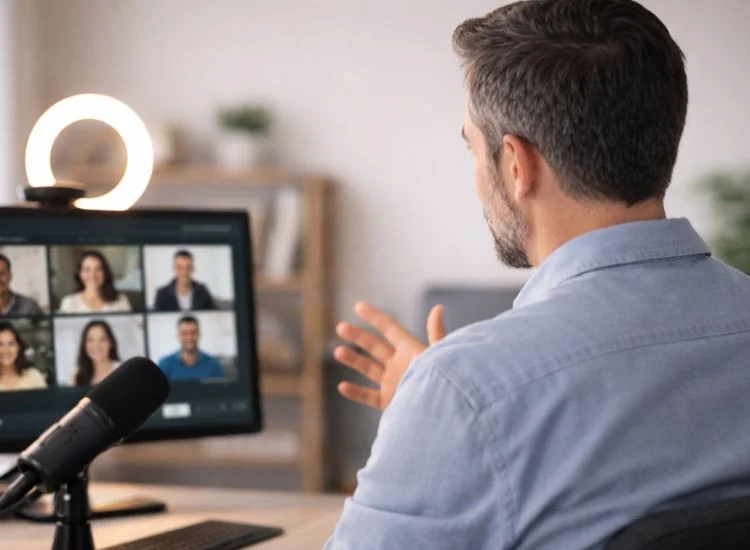
Even on a webinar, body language matters. Your audience is watching how you hold yourself, even in a cropped video frame.
Sit upright, with your shoulders and back relaxed. Leaning forward slightly signals engagement. Slumping backward reads as disinterest or fatigue.
Your posture affects your voice, too. Upright posture opens your diaphragm and supports fuller, more controlled breathing, which directly improves your vocal delivery.
Visible hand gestures in the frame make you look more animated and confident. Keep them natural, don't force them, but don't hide your hands either. Hands visible at chest height are appropriate for most webinar formats.
Avoid looking down at notes. It breaks the impression of confidence instantly. If you need reference material, position it so your eyes stay level, or use a tool that keeps your script in your sightline.
On a webinar, looking at your camera lens is the equivalent of making eye contact. This is one of the most overlooked confidence signals in virtual presentations.
Most people look at their own video thumbnail, or at the faces of attendees on screen. Both cause your eyes to be visibly off-center to viewers, which reads as distraction or discomfort.
Train yourself to look directly at your camera lens when speaking. Position your script, notes, or teleprompter display as close to your camera as possible so your eye line stays central.
Researchers from the University of Tampere found that virtual eye contact triggers the same psychological response as in-person eye contact. The perception of being seen by another person is enough to activate feelings of calm, connection, and social engagement, even without physical presence. Zoom In practical terms, that means looking at your lens, not your screen, builds audience trust in real time.
One of the most common breakthroughs presenters experience is realizing they can maintain that eye contact and follow a script at the same time when their script is displayed at eye level near the camera. Preparation and presence no longer have to compete.
For a deeper look at how platform choice affects audience connection, see the best webinar platforms' comparison.

Most presenters go live cold, and it shows. Your voice, like any instrument, performs better when warmed up.
Run through a few quick exercises before you open the webinar:
Slow, diaphragmatic breathing activates your parasympathetic nervous system and reduces the physical symptoms of anxiety, racing heart, shallow breath, dry mouth.
Try the 4-7-8 technique: inhale for 4 counts, hold for 7, exhale for 8. Two or three rounds of this immediately before going live makes a noticeable difference.
How you hold your body in the minutes before a webinar affects how you sound during it. Tension in your shoulders, jaw, and chest tightens your voice and shortens your breath.
Take 60 seconds to stand up, roll your shoulders back, and shake out any physical tension. Stand upright with your feet planted and your chest open. This isn't a performance trick, it's a physical reset that directly improves your posture, your breathing, and the quality of your voice when you sit back down.
Think of it as the equivalent of a athlete loosening up before a race. You wouldn't start cold. Neither should your body.
The Q&A section is where many presenters unravel. Unscripted, unrehearsed, and under pressure, it's where every hesitation and filler word surfaces.
Before your webinar, write out the 10 questions you're most likely to receive. Practice answering them out loud. You won't eliminate surprise questions, but you'll handle 70–80% of your Q&A with prepared, confident answers.
For strategies on running a smooth Q&A, see our detailed guide on webinar Q&A sessions.
Saying "I don't know" confidently is far better than rambling toward a guess. Use a bridge: "That's outside my area, let me find out and follow up with you directly." This signals honesty and professionalism, not weakness.
Silence between questions or while reading a chat message feels longer to you than it does to your audience. Narrate what you're doing: "Let me read through a few of these questions" buys you time and keeps the atmosphere comfortable.
Sounding confident on webinars comes down to three things: solid preparation, deliberate vocal delivery, and a setup that works for you, not against you.
Slow down your pace. Eliminate filler words with intentional pauses. Look at your camera lens. Warm up your voice before going live. And stop trying to hold everything in your head when you don't have to.
For a full picture of what makes webinars work, explore the complete webinar statistics breakdown and our roundup of webinar engagement strategies.
Stop winging it. Use Teleprompter.com to script, rehearse, and deliver your next webinar with total confidence, no hardware needed. Start for Free!
Preparation reduces nerves more than any mindset technique. Know your material, warm up your voice, test your tech in advance, and have your script or outline visible. Diaphragmatic breathing in the minutes before going live also calms the physical symptoms of anxiety.
The ideal pace for webinar presentations is 130–150 words per minute, slower than everyday conversation. This gives your audience time to process information and signals that you're calm and in control.
Look directly at your camera lens, not at the video thumbnails on your screen. Position any notes or teleprompter display as close to your camera as possible so your eyes stay naturally centered on the lens.
Replace fillers with intentional silence. When you feel the urge to say "um," close your mouth and pause for 1–2 seconds instead. This takes practice but becomes natural quickly. Recording yourself during rehearsal helps you identify how often fillers occur and where.
Yes, especially if you're not an experienced presenter. A well-prepared script prevents rambling, keeps your pacing on track, and eliminates the mental load of remembering what comes next. The key is delivering it naturally, not reading it robotically.
A teleprompter displays your script at eye level so you can read it while appearing to look directly at the camera. Apps like Teleprompter.com use voice-synced scrolling so the text moves with you automatically, removing one of the biggest confidence killers in live presenting: losing your place mid-thought.
Vary your pace, pitch, and volume deliberately. Use pauses between points. Speak to your audience the way you'd explain something to a colleague, not the way you'd read a report. Rehearse out loud until the words feel like your own, whether you're using a script or not.


.png)


.png)