


Global participation in online learning continues to climb, with well over 220 million people now engaging in digital courses across major platforms. This rapid growth reflects a clear shift toward flexible, accessible education that supports busy learners and professionals. As online learning expands, teaching and coaching through video have become trusted ways for educators to reach wider audiences with structured, easy-to-follow lessons.
Learners expect content that feels organized and personal. Coaching clients look for guidance that feels clear and steady through the screen. These expectations have made strong on-camera communication a necessary skill for anyone teaching online. With simple tools like a teleprompter app, educators can stay focused, maintain natural pacing, and deliver polished lessons without needing a complicated setup.

Online education continues to grow because it solves problems for both teachers and learners. Flexibility, accessibility, and global reach have made virtual instruction the preferred way to learn new skills, develop professionally, or seek specialized coaching.
Students can learn at their own pace. Professionals can join programs from anywhere. Coaches can work with clients across time zones. And educators can build a long-term career around their knowledge without needing physical classrooms.
Digital platforms have lowered the barrier to entry. Course platforms, scheduling tools, and teleprompter apps make it easier to package and present information clearly. Tools are more intuitive, and software supports everything from planning to recording.
For educators who are building their first recording space or want to upgrade what they have, this online teaching setup guide is a helpful starting point:
Clarity and structure matter more online than in any other environment. Without physical presence or real-time classroom energy, your words, pacing, visuals, and lesson design carry the full learning experience.
The strongest educators share these essential skills:
Online learners rely on steady, organized explanations. Every sentence needs purpose. Planning script outlines before recording helps maintain focus and prevents unnecessary detours.
You don’t need to perform. You need to be clear, relaxed, and intentional. A teleprompter helps you maintain eye contact and avoid losing your train of thought while delivering lessons with confidence.
Breaking information into modules prevents overwhelm. Organized lessons improve retention, simplify recording, and make content easier to revisit.
Modern teaching requires familiarity with recording devices, teleprompter apps, learning platforms, and basic editing tools. Comfort with these tools reduces friction and keeps lessons running smoothly.
Tone, pacing, visuals, and delivery all influence how learners stay connected and involved. Coaches, in particular, benefit from techniques that keep sessions interactive and focused. This guide on practical online coaching techniques explores ways to structure sessions, maintain clarity, and support meaningful engagement in virtual settings.
These skills allow you to communicate effectively and build learning experiences that feel intentional and personal.
For deeper guidance on strengthening your online teaching approach, these related articles cover proven methods and essential skills for digital educators:
Video has become the default teaching method online because it builds connection and improves retention. Students relate more easily to an instructor speaking directly to them, and coaches create deeper trust when they communicate on camera. Video also allows learners to pause, rewind, and revisit information at any time.
Video supports visual learning, demonstrations, and examples that printed content cannot achieve on its own. Even simple videos can feel polished when delivered with clarity and steady pacing. Many educators enhance this consistency with tools that support smooth delivery
Because video sits at the heart of online learning, tools that strengthen communication have become essential for modern educators. Teleprompters, especially app-based versions, offer a simple way to stay organized and maintain a natural flow during recorded lessons.
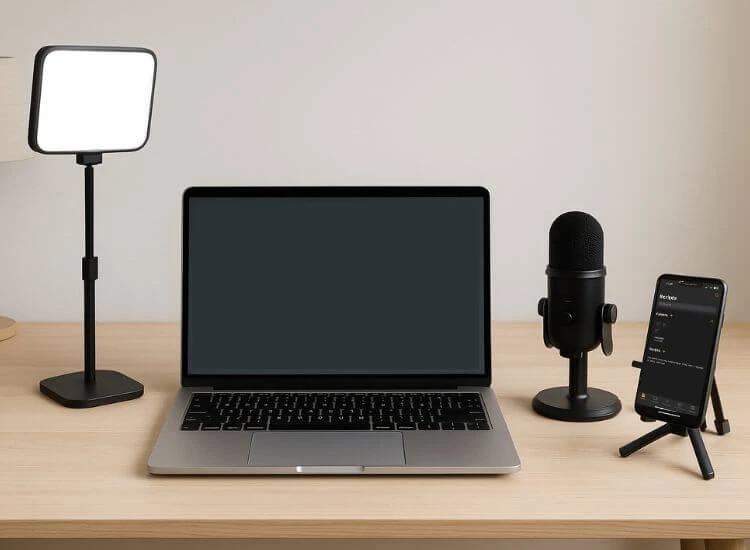
A professional online teaching setup doesn’t require a large budget. It requires clarity, stability, and consistency.
Here are the essentials:
Educators looking for a curated list of tools can also explore the best tools for online teaching.

Teleprompter apps are now essential for teachers and coaches who want to record structured, confident, and polished lessons.
Teleprompters don’t replace your teaching style. They support your presence and help your delivery feel more natural on camera. If you want to refine how you use one in real teaching scenarios, explore practical teleprompter techniques for online teachers to improve pacing, eye contact, and overall delivery.
If you’re ready to try it for your next lesson, you can sign up for free at Teleprompter.com and test it with a short script or outline.
Keeping students engaged online takes intention. These strategies help educators create learning experiences that feel active and focused.
For further reading: (Internal link: “interactive online lessons” → How to Create Interactive Online Lessons That Keep Students Focused)
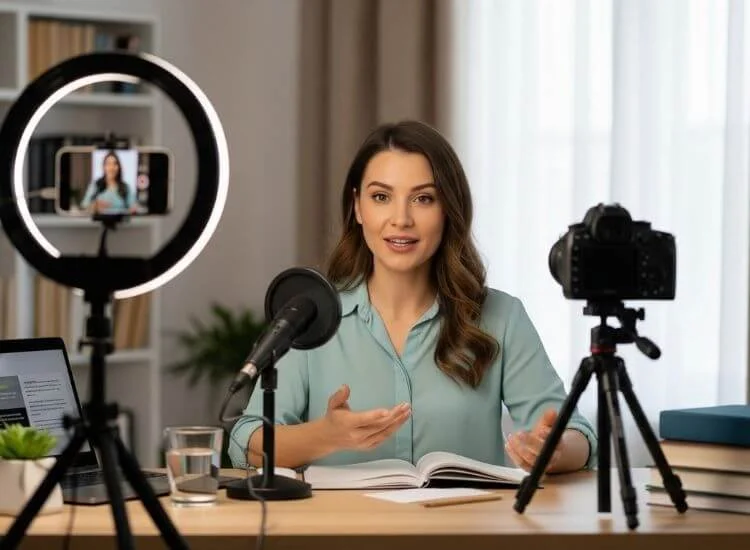
A reliable workflow makes recording lessons smooth and consistent. Here’s a streamlined system educators use to produce professional content without overwhelm:
Break your ideas into small, logical modules. This gives your lesson structure and direction.
Scripts help maintain clarity. Speaking points provide flexibility. Both support focused delivery.
This saves time, prevents rambling, and ensures cleaner takes. Teleprompters guide your voice, pacing, and eye contact.
Good lighting and clean audio make your content feel intentional. A stable camera setup adds polish.
A quick practice run helps you adjust speed, tone, and emphasis.
This makes recording manageable and editing easier.
Trim pauses, add text overlays if helpful, and check audio levels. Less is more.
Add your final video to your course platform, along with notes, worksheets, or additional materials.
This workflow reduces stress and helps you produce consistent, high-quality videos every time.
Online teaching has grown into a stable and scalable long-term path. Success comes from consistency, strong presentation skills, and efficient workflows. Key components of long-term growth include:
Courses, coaching, workshops, memberships, and templates spread your income across multiple formats and price points. If you’re still defining what you’ll offer and how you’ll package it, follow a step-by-step plan for setting up an online coaching business to clarify your niche, pricing, and client-friendly structure.
Regular videos and updates strengthen your brand, build connection, and keep your audience engaged.
Clear delivery improves trust and positions you as a reliable guide. Teleprompters play a major role in strengthening your presence and pacing.
Burnout decreases when your process is predictable. Tools that simplify recording and scripting keep your schedule manageable and your quality high.
When you treat your knowledge as something that can be distributed and repurposed, your impact grows far beyond individual sessions.
Educators who build systems, refine their delivery, and stay consistent see long-term success in this expanding digital landscape.
Online teaching and coaching continue to grow because they support flexible, effective learning. With clear communication, thoughtful structure, and reliable tools, educators can create lessons that feel personal and professional on any platform.
A tool like Teleprompter.com helps you deliver with clarity, confidence, and consistency, the qualities students and clients appreciate most. Whether you’re recording course modules, presenting live classes, or coaching through video, a teleprompter strengthens your delivery and simplifies your process.
Modern teaching is built on strong communication and reliable systems. With the right tools, your knowledge can reach people everywhere.
If you're exploring how to integrate it into your workflow, you can also check Teleprompter.com pricing to see which plan fits your teaching or coaching setup best.
You need a clear microphone, simple lighting, a stable camera or smartphone, and a teleprompter app for organized delivery. These essentials help you record lessons that feel polished and easy to follow without building a full studio setup.
A teleprompter helps you maintain eye contact, stay on script, and deliver lessons with clear pacing. It reduces retakes and keeps your content organized, making your videos feel more confident and professional.
Clear communication, strong on-camera presence, organized lesson planning, and basic tech confidence are essential. These skills help you deliver structured, engaging lessons that hold students’ attention in a virtual environment.
AI can help generate scripts, create quizzes, organize content, and enhance audio or captions. These tools streamline preparation and production so educators can focus more on delivering meaningful lessons.
Use short modules, visuals, interactive elements, and steady pacing. These techniques help maintain attention and make lessons easier to absorb, especially when combined with a clear and confident on-camera delivery.


.png)


.png)


