

Scripting can be the difference between a polished YouTube video and one that loses viewers within seconds. A YouTube teleprompter script gives creators the structure they need to stay clear, natural, and consistent while recording.
With Teleprompter.com, you can write, load, and read scripts directly from your phone, tablet, or desktop. This guide explains why scripts matter, how to create them effectively, and how to use Teleprompter.com to deliver professional-level content.
YouTube is the main platform for video education, entertainment, and marketing. Even confident presenters can trip up without preparation. Here are a few reasons a YouTube teleprompter script makes your videos sharper and easier to produce:
That benefit shows up in real creator workflows, too. Creators often mention how scripting helps them stay natural on camera. For example:
This reflects a common advantage—being able to follow a script while maintaining eye contact and a natural delivery.
There’s a strong business reason, too. According to Wyzowl's Video Marketing Statistics 2026, 91% of businesses now use video for marketing, and YouTube is the top platform for sharing. With so much competition, having a well-structured teleprompter script isn’t just helpful; it gives you an advantage.
If you’re weighing the benefits of scripting versus speaking freely, our guide on scripted vs unscripted videos breaks down which approach works best for different content types

The audience should be the first consideration in any script. Are you addressing an advanced audience that demands technical detail or a beginner who needs straightforward explanations? Understanding this helps shape your vocabulary, pacing, and tone. When your teleprompter script feels more like a conversation than a lecture, it becomes far more engaging.
If you already have written content, you don’t always need to start from scratch. Many creators adapt existing material into scripts, especially when repurposing articles or long-form posts. Learning how to turn written content into a video format can make this process faster while keeping your message consistent.
The best-performing YouTube videos share a common structure: hook, value, and call-to-action. Start with an attention-grabbing hook that lasts for 15 seconds. Keep your main points concise and steer clear of superfluous digressions. Finish with a call to action that feels organic rather than coerced, like signing up, clicking a link, or leaving a comment.
Short sentences are ideal when writing for a teleprompter. They make the screen appear less crowded, are simpler to read, and decrease stumbling. Consider your script to be your personal captions, directing your performance in real time.
You should never sound robotic because of a script; place line breaks or basic cues where pauses are appropriate to avoid that. Make important words stand out when scrolling by emphasizing them with formatting or punctuation. By practicing these pauses, you can enhance your delivery and maintain the video's interest throughout.
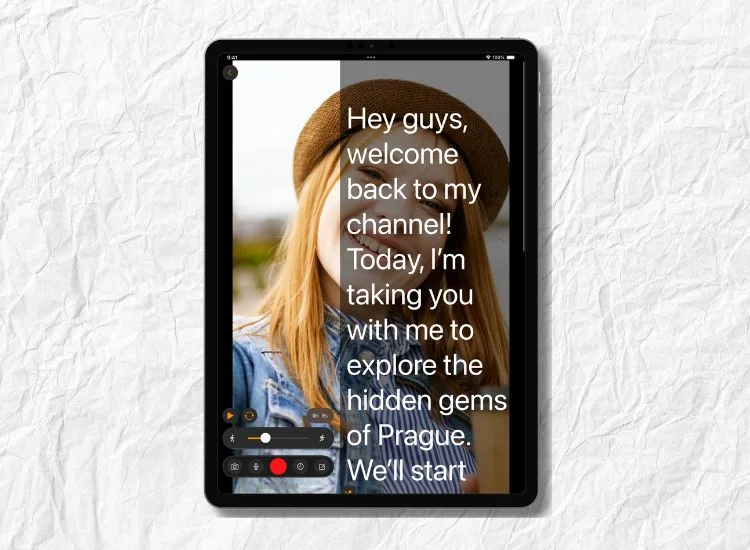
Teleprompter.com is designed to make script reading smooth and flexible for creators at all levels.
Many also point to features like adjustable speed and multi-format support as key reasons it fits both short-form and long-form content.
Check out the full list of Teleprompter.com platform features to see how the app helps creators script, record, and deliver professional-quality videos with ease.
Here are some tips to help you sound natural while staying on track with your script:
Creating YouTube videos that connect with your audience starts with a solid script. It helps you stay focused, reduce filming errors, and deliver your message with confidence. With Teleprompter.com, scripting becomes effortless — thanks to features like cross-device syncing, mirror mode, and adjustable scrolling that fit any creator’s setup.
If you’re looking to grow your channel and refine your skills, explore our guide on how to become a YouTuber. It’s a great next step to build your presence and pair your scripting efforts with a clear growth strategy.
Try Teleprompter.com today to make your video creation process smoother, faster, and more professional.
Most YouTube videos perform best between six and ten minutes, which translates to about 900–1,500 words. Shorter scripts work for quick tips, while longer formats are better for tutorials or reviews.
Yes. The app supports live setups, letting you scroll your script naturally while keeping your eyes on the camera. This is especially helpful for webinars or live Q&A sessions.
Not necessarily. Some creators prefer full scripts, while others use bullet points for flexibility. The choice depends on your style and how comfortable you are improvising.
Practice is key. Read aloud multiple times, adjust scrolling speed to your comfort, and insert natural pauses. Over time, your delivery will sound fluid and authentic.


.png)


.png)