

Online courses get results when learners stay engaged long enough to practice. That usually starts with a script that sounds like a real person teaching, not a document being read out loud. This guide covers how to write a script for an online course with clear learning objectives, strong pacing, and a delivery style that feels natural.
You’ll walk away with a repeatable lesson structure, practical writing techniques for spoken video, and a teleprompter-ready format that makes recording smoother.
Natural does not mean unplanned. It means the learner can follow your thinking without effort. The language feels spoken, the examples feel real, and each lesson has a clear purpose.
A script also protects outcomes. Coursera’s 2023 Learner Outcomes Report found that 77% of learners reported career benefits from learning. Results like that tend to come from structured teaching, not wandering explanations.
When people search for a guide on writing an online course script, they often want two things at once: clarity for the learner and ease for the instructor. A good script gives you both.
An outline is your map. It lists modules, lesson titles, and the order. A lesson plan is your teaching plan. It captures key points, examples, and activities. The script is the exact wording you will say. A storyboard adds the visual layer, including slides, screen recordings, on-screen text, and any b-roll.
If you want your course to sound natural, the script is the piece that matters most. It turns ideas into spoken instruction.

Before you write a single line of narration, define what the learner will be able to do by the end. Keep it specific. “Publish a three-lesson mini course” is clearer than “Create better courses.” This promise becomes your filter for every lesson.
Now define the learner persona in one paragraph. Name their current level, their goal, and their constraint. Time constraints matter. Confidence constraints matter. Device constraints matter too. Many learners watch on phones, so your script needs tight explanations and clean signposting.
This step makes writing a script for your online course much easier because you stop writing for a vague crowd. You write for one clear learner.
For each lesson, write one outcome using this structure: action verb + skill + context.
Example: “Draft a lesson hook that states the outcome in one sentence.” Put that outcome at the top of the script document. Keep it visible while you write.
Outcomes keep the lesson lean. They also help you avoid adding interesting side notes that do not move the learner forward.
A natural script has a reliable rhythm. Learners relax when they know what’s coming. You can create that feeling by using the same framework in every lesson. A consistent structure also speeds up your writing.
Use this flow for most lessons:
This format supports focus and pacing. Research on MOOC videos at edX, based on 6.9 million video-watching sessions, found that shorter videos tend to be more engaging. Keeping lessons structured makes it easier to stay short and purposeful.
If you want the simplest version of how to write a script for an online course, it is this: write one outcome, teach one idea, show one example, then give one action step.
Your format changes how you script. Talking-head lessons rely on presence and pacing. Slide lessons rely on signposting and short sentences. Screen recordings rely on step-by-step clarity.
Pick the format that helps the learner act fastest. When the format is set, your script gets simpler because you know what the viewer sees at every moment.

Natural delivery comes from spoken writing. Spoken writing has a different shape than blog writing. It uses shorter sentences, fewer stacked clauses, and cleaner transitions. It also uses everyday words for complex ideas.
A practical approach is to write the first draft slightly informal, then polish for clarity. If you want a faster starting point, try a script generator to create a first draft, then revise it so it matches your teaching style and lesson goals. Keep contractions. Use “you” and “we” when it fits. Keep the language direct and instructional so learners always know what to do next.
If your script feels too formal, read it out loud. Your voice will flag the problem fast. Any line that makes you stumble needs rewriting. Do that loop a few times and your script will start to sound like you.
Want a quick reality check before you record a full lesson? Open the teleprompter and start reading your first 30 seconds. You’ll immediately hear which sentences need trimming and where you need a pause.
This step is essential in scripting an online course because learners can hear when language was written for the page, not for the ear.
When you write long sentences, you invite rushed delivery. Shorter lines help you slow down. They also sound more confident on camera.
Aim for one main idea per sentence. Add a period. Keep moving. If you need a second idea, give it a new sentence.
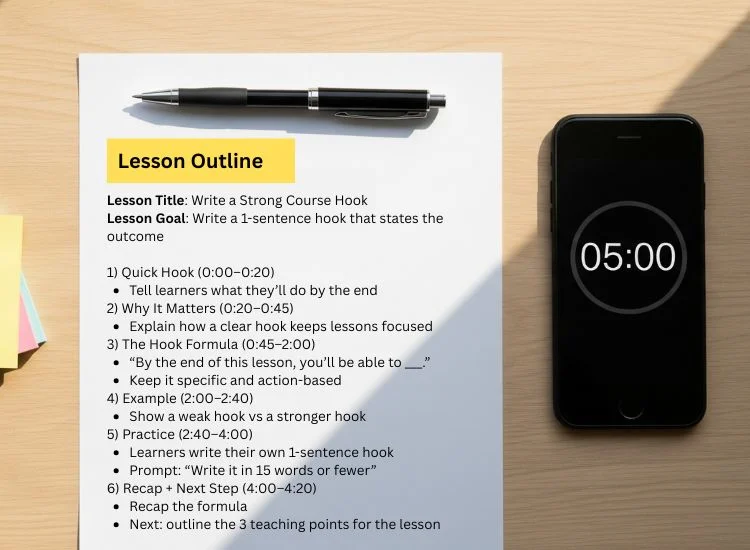
A script is also a design tool. It helps you decide what not to say. Multimedia learning research often highlights the value of excluding extraneous information and using clear signals for what matters, so learners can focus on the goal.
You can apply those ideas with simple script rules:
Keep definitions short. Give one example immediately. Use labels like “Step 1,” “Step 2,” and “Step 3” to signal structure. Repeat the outcome at the end in one clean recap.
When you do this consistently, writing an online course script becomes less about writing more. It becomes about writing with intention.
A natural script keeps learners involved. Add one small prompt every 30 to 60 seconds. Prompts keep attention anchored and create forward motion.
A prompt can be as simple as: “Pause and write your first sentence.” Another option is: “Open your worksheet and fill in the top row.” You are giving the learner a concrete task. That task makes the lesson feel practical.
The first 20 to 30 seconds set the tone. Keep it tight. State the outcome. Name the problem it solves. Tell the learner what they will do in this lesson.
Here is a strong pattern you can reuse:
That opening sounds natural because it is clear. It also sets expectations, which lowers friction for the learner.
If you want your course to sound natural, write your openings last. Once you finish the lesson, you know exactly what you taught. Your opening can match reality.
This is a practical tactic for writing a script because it prevents inflated promises and vague previews.
Use one credible stat near the beginning of the course or module to reinforce why the skill matters. Coursera’s outcomes reporting is a useful example because it connects learning to real benefits at scale.
Keep the reference short. Tie it to learner motivation. Then move on. The goal is trust, not trivia.
A two-column script reduces confusion during filming and editing. It also helps you avoid describing what the learner can already see. That alone makes your delivery sound more natural.
Set up two columns:
Here is a quick example:
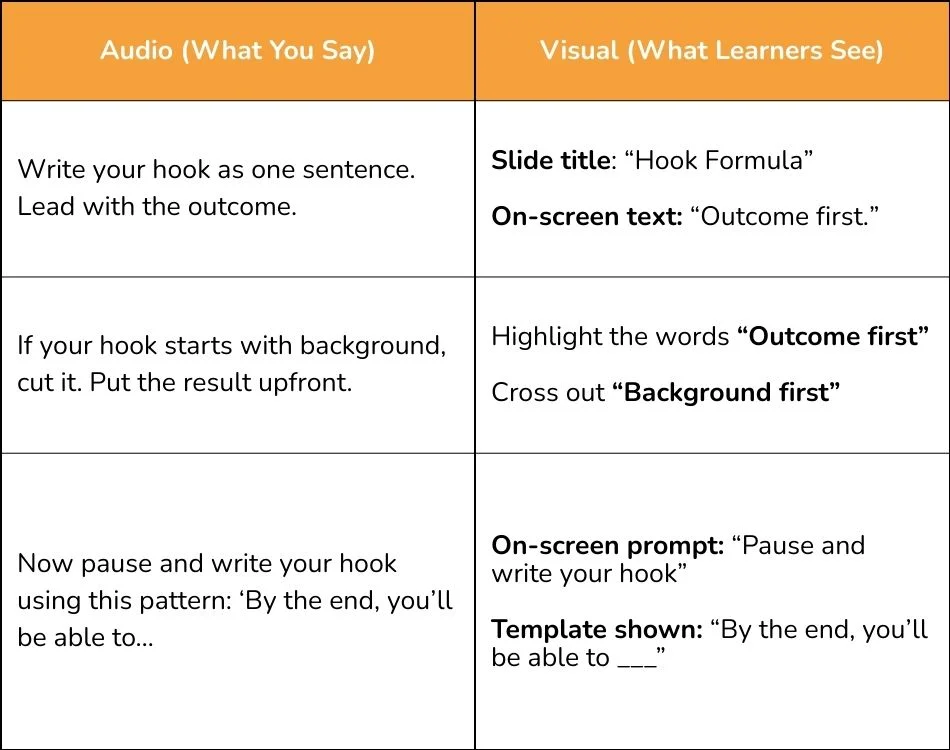
When you align audio and visuals like this, your narration stays grounded. That is a key part of how to write a script for an online course that learners can follow without rewinding.
A teleprompter helps you deliver a script while keeping eye contact. Eye contact makes online teaching feel personal. Teleprompter.com also emphasizes that an online teleprompter can support confidence and keep script flow steady, which helps delivery feel consistent across sessions.
To make your script teleprompter-ready, format it for the eye. Use shorter lines. Leave space between paragraphs. Avoid huge blocks of text. Add simple cues that guide delivery.
Use bracket cues sparingly, like [pause] or [smile]. These cues help you sound human because they remind you to vary rhythm. They also prevent the “flat read” that makes scripts feel stiff.
If you used the two-column approach earlier, this part gets easier. Paste only your Audio lines into the teleprompter. Keep the Visual notes in your script doc so you can follow slide changes or screen steps without cluttering what you read on camera.
Ready to test it quickly? Start recording now by loading one lesson into your teleprompter and reading the script straight through. You’ll catch awkward phrasing and timing issues fast, and your next take will sound cleaner.
Do one table read out loud. Then record a 30-second test clip. Watch it once. Fix only what is obvious. Then move forward.
The goal is steady progress. Your scripts will improve as you record more lessons.
Transitions are what make a course feel professional. They also make the content easier to follow on mobile, where attention shifts quickly.
End each lesson with two sentences. Sentence one recaps the action the learner took. Sentence two previews the next step. Keep it direct.
A good bridge sounds like: “You wrote your hook. Next, you’ll outline the three teaching points that support it.” That is clear, simple, and it keeps momentum.
When you include transitions intentionally, how to write a script for an online course stops feeling like separate lessons. It starts feeling like a guided path.
Quality control is where your script becomes reliable. Read the script out loud and listen for any line that feels too long. Rewrite those lines with shorter sentences. Keep verbs strong. Keep steps clear.
Then check for structure. Confirm that the outcome appears early. Confirm that you included one example that matches the learner persona. Confirm that you gave at least one practice prompt.
Use a short checklist when you finish a lesson:
This process improves clarity. It also keeps your course consistent from lesson to lesson.
Use these templates to speed up writing and keep lessons consistent. Here’s a sample template that you can use:
Lesson Title: [Insert Lesson Title]
Lesson Goal: Help learners achieve one clear outcome in one session
Outcome: By the end of this lesson, learners will be able to [action verb + skill + context].
0:00–0:03 | Welcome + Outcome
0:03–0:08 | The Problem This Solves
0:08–0:18 | Teach the Core Concept (Part 1)
0:18–0:28 | Teach the Core Process (Part 2)
0:28–0:38 | Guided Example or Demo
0:38–0:48 | Learner Practice (Do It Now)
0:48–0:55 | Fix Common Mistakes + Improve Results
0:55–0:59 | Recap + Quick Checklist
0:59–1:00 | Next Step Assignment
Natural course delivery comes from clear structure and spoken writing. Start with outcomes, then build lessons with a consistent framework that includes an example and a learner action. Keep sentences short. Keep visuals aligned with your narration. Add transitions so learners always know what happens next.
Following this scripting approach for your online course will reduce re-records, simplify editing, and give learners a smoother experience.
Before you record, run your lesson through a script readability tool to catch long sentences and tighten the phrasing so your delivery stays natural.
Start with one lesson outcome, then write a simple flow: hook, teach, example, practice, recap. Keep sentences short and spoken. Add one action prompt every minute so learners do something, not just listen. This is the quickest way to build a script that stays clear and records smoothly.
Aim for one outcome per lesson. Many lessons land at 3 to 10 minutes when you include one example and one practice prompt. Before filming, time your lesson so you know if you’re on track for a 5–10 minute runtime and where to trim.
Script intros, explanations, and transitions. Use lighter notes for demos after your pacing feels steady and your lesson structure stays consistent.
Aim for one lesson outcome, three teaching points, one example, and one practice prompt. If your script starts covering multiple outcomes, split it into two lessons. Time your read aloud to check pacing. Shorter lessons often hold attention better and make editing faster when you record.
Write one lesson outcome and cut anything that does not support it. Add a recap at the end to keep the lesson contained and clear.


.png)


.png)