

Video has become a standard format for marketing, education, sales, and creator content, but better videos do not always require expensive gear. For many people, the bigger challenge is speaking clearly on camera, staying on script, and keeping eye contact with the lens. That is where a teleprompter can make a real difference.
The best budget teleprompters in 2026 help creators and teams record with more confidence while keeping setup costs under control. A well-chosen affordable model can reduce retakes, improve delivery, and make videos look more polished without forcing a full studio upgrade.
That makes budget teleprompters especially useful for solo creators, coaches, educators, small businesses, and remote teams producing content on a regular basis.
This guide covers the best budget teleprompters 2026 buyers should consider, along with the features that matter most, common tradeoffs at lower price points, and practical tips for getting better results from a simpler setup.
Budget teleprompters matter in 2026 because video is now a normal part of how creators, educators, and businesses communicate online. According to Wyzowl’s 2026 report, 91% of businesses use video as a marketing tool, which shows how important video has become across industries.
At the same time, not every team has the budget for a studio-grade setup. That is why affordable teleprompters are so useful. They help improve delivery, reduce retakes, and make it easier to keep your eyes near the lens without adding a major cost to your workflow.
They also fit the way content is created now. Many people record with smartphones, tablets, webcams, or compact cameras in home offices and small studios. In setups like these, a budget teleprompter can make videos look more polished while keeping production simple.
That value becomes even clearer when video budgets stay active. Wyzowl found that 92% of marketers plan to spend the same or more on video in 2026, which suggests that teams still see video as worth the investment, but many will continue looking for practical, cost-conscious tools.
These picks focus on widely available models with clear specs, published prices, and solid compatibility. The sweet spot in 2026 is usually $99 to $299 for hardware that uses your phone or tablet as the display or a compact desktop unit with a built-in screen. Prices below are for the hardware only, unless stated otherwise.
If your priority is the lowest spend with reliable parts, the TMP 50 is one of the easiest ways to get started. It is listed at $99 and features 70/30 beam-splitter glass with a reading range up to 10 feet. It can work with smartphones, as well as small cameras with physically short lenses and action cameras in narrow-angle settings. The clamp supports phones and tablets up to 6.7 inches wide.
Why it is a strong 2026 budget pick: it keeps the purchase simple. You already own the screen, and you can run your script from a teleprompter app. If you publish short-form content often, the fast setup and light weight may matter more than extra accessories.
Desview’s T3 stands out for its balance of price and compatibility. It is listed at $99 and supports prompting devices up to 11 inches. It also includes a Bluetooth remote, supports vertical or horizontal shooting, and ships with multiple lens adapter rings from 49mm to 82mm.
Desview also notes wide-angle support in its product details. In DSLR and tablet prompting mode, it supports more than 24mm horizontal shooting and less than 35mm vertical shooting.
Why it is a strong 2026 budget pick: it covers the most common creator setups, including phone or tablet plus mirrorless or DSLR, includes the remote, and supports vertical formats without awkward workarounds. If your content mix includes YouTube videos, reels, and TikTok-style vertical content, this is a practical low-cost option.
Padcaster’s Parrot Pro is built for speed and portability in phone-based prompting. It is listed at $149 and features 70/30 beam-splitter glass, direct lens mount rings, support for camera lenses up to 24mm, and smartphone support up to 4.2 inches wide.
The Bluetooth remote supports start and stop scrolling, speed control, and page navigation. Included lens rings cover common sizes from 52mm to 82mm.
Why it is a strong 2026 budget pick: it is compact, portable, and easy to carry, while still helping you maintain a more professional eye line on camera. If you record interviews, quick explainers, or product videos on a mirrorless or DSLR setup, it is a practical middle ground between ultra-cheap kits and larger tablet rigs.
For webcams and laptop cameras, compactness matters. Glide Gear’s product page lists The Little Prompter at $119.97 and describes it as an entry-level compact teleprompter for laptops, smartphones, and DSLRs.
It has a small footprint at 6 x 6 x 6 inches, weighs under a pound, and uses 70/30 beam-splitter glass.
Why it is a strong 2026 budget pick: it is designed for desk and laptop workflows where a full camera-mounted prompter would feel too bulky. It suits presentations, coaching sessions, training content, and sales demos where eye line and confidence matter more than a larger production rig.
The TMP 75 is aimed at creators who alternate between laptop calls and dedicated camera shoots. It is listed at $179 and works by attaching over a laptop webcam with two adjustable hooks, while using a smartphone in the front tray to reflect text onto 70/30 beam-splitter glass.
It is also described as a 3-in-1 teleprompter because it can support a DSLR or mirrorless camera on the back and mount to a tripod or shoulder rig using included 15mm rods.
Why it is a strong 2026 budget pick: it suits a modern workflow where you might record a product video in the morning and run client calls later with the same gear. The main thing to check is laptop fit, since screen thickness and webcam position can affect alignment.
If you want one budget teleprompter that covers most creator scenarios, the TMP 100 is a strong default. It is listed at $199 and is described as a collapsible tripod-mount teleprompter that supports tablets or phones up to 10.5 x 8 inches. It also includes an adjustable 70/30 beam-splitter hood and side mounts for lights and microphones.
Product details also note a 10-foot reading range and a collapsible, no-assembly design that mounts directly on a tripod.
Independent gear coverage has also positioned it as a value-oriented option, praising its rugged build, 70/30 beam-splitter glass, and suitability for quick shoots and travel.
Why it is a strong 2026 budget pick: it is priced like a beginner purchase, but it can scale into a more polished workflow, especially if you pair it with a decent microphone and consistent lighting.
NEEWER’s X12B is built for creators who want a larger prompting surface and a tidy, repeatable setup. NEEWER lists the BASICS X12B at $139.99 and positions it as part of its economical line focused on essential functions.
The product description highlights an installation-free design, aluminum alloy construction, an included remote, and 75% light transmittance from the beam-splitter glass. NEEWER also states that it supports devices up to 9.84 x 8.68 inches, including the iPad and iPad Pro 11, while noting that it is not compatible with the iPad Pro 12.
It is also important to note that NEEWER does not recommend it for wide-angle lenses, with a focal length requirement above 28mm.
Why it is a strong 2026 budget pick: it is a solid option for lectures, tutorials, and controlled indoor setups where lens choice stays consistent. The main thing to confirm before buying is your focal length and framing, so you avoid vignetting.
If you record at a desk and do not want to mount a separate tablet, Elgato Creator’s Prompter makes sense. It is listed at $299.99 and is designed for cameras, smartphones, and webcams, with a built-in 9-inch 1024 x 600 display.
Independent gear coverage also highlights it as an all-in-one teleprompter designed for desk setups, with the built-in display and quick setup being two of its biggest strengths.
Why it is a strong 2026 budget pick: it costs more than a standard phone-and-glass rig, but it can save time every week if you record often. For creators and small teams, that convenience may be worth the extra spend.
If you need a more studio-like kit, the Datavideo TP-300 follows a classic tablet teleprompter format while staying well below the cost of broadcast systems. It is listed at $499 and uses the Datavideo DV Prompter app on iOS or Android, with scrolling set automatically or controlled through a remote sold separately.
The kit also includes a 60/40 glass sheet, which is different from the 70/30 glass found in many lower-cost models.
Why it is a strong 2026 budget pick: it gives creators and teams a more traditional tablet-prompter setup without moving into the price range of full studio systems. It makes the most sense for longer scripts, repeat productions, and more fixed recording environments.
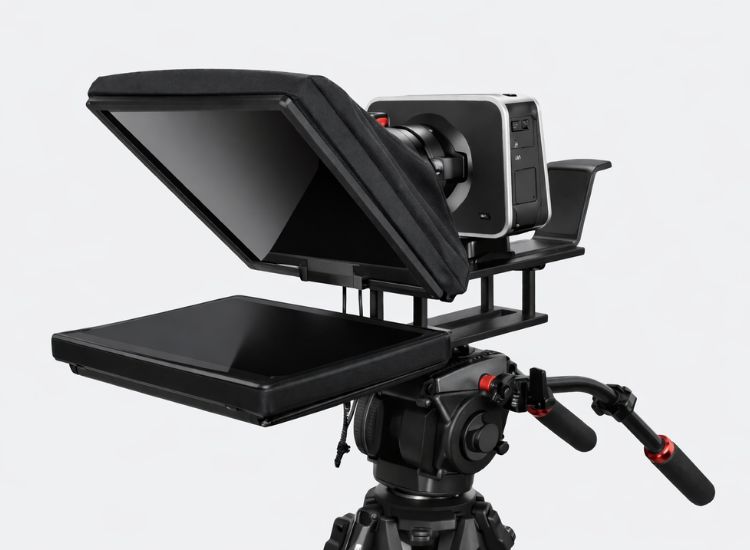
A budget teleprompter should match the way you actually record. Some models are better for DSLR or mirrorless cameras, while others work best for webcams, laptops, or phone-first setups.
Picking the right format matters more than chasing extra features you may never use. Teleprompter.com’s setup guide breaks these common options into camera-mounted, desk/webcam, and portable phone-based setups, which is a practical place to start.
After that, focus on the details that affect usability and video quality. Glass quality matters because it affects how clearly you can read the text and how clean the footage looks through the lens. A common teleprompter glass spec is 30R/70T, which means 30% reflective and 70% transparent.
You should also check lens compatibility, especially if you use a wide-angle lens, since some budget teleprompters have limitations. For example, NEEWER states that its X12B is not compatible with wide-angle lenses and requires a focal length above 28mm.
It also helps to think beyond the teleprompter itself. Your final setup may include a phone or tablet for script display, a tripod, lighting, a microphone, and a remote for smoother control. That full setup will affect your results more than price alone. Small adjustments like font size, margins, and scroll speed can make a major difference in how natural you look on camera.
Want help building a setup that actually works in real recording conditions? Read Best Teleprompter Setup for practical tips on hardware, lighting, script formatting, and smoother delivery.

A teleprompter works best when your setup helps you stay close to the lens and speak at a natural pace. Research on video communication shows that on-camera gaze improves how viewers rate likeability and social presence, which is a major reason teleprompters help recorded videos feel more personal and polished.
Pacing matters too. The National Center for Voice and Speech notes that average spoken English is around 150 words per minute, while Baruch College suggests slowing closer to 140 words per minute when clarity matters. That makes scroll speed one of the most important teleprompter settings to test before recording.
A few small setup changes can make budget teleprompters look much more polished:
The main idea is simple: keep your setup readable, your pacing steady, and your eye line tight to the camera. That combination usually does more for delivery than buying a more expensive teleprompter.
For smoother delivery, it helps to use software with better control over scroll speed, pacing, and readability. See Teleprompter.com platform features to explore tools that can support better eye contact and easier recording.
The best budget teleprompters in 2026 make recording easier without pushing you into a costly studio setup. For most creators, a phone or tablet teleprompter in the $99 to $199 range is enough to improve eye contact, reduce retakes, and create a more confident on-camera delivery. Brands like Glide Gear, Desview, Padcaster, and NEEWER all offer options worth comparing, depending on your camera setup and preferred screen size.
The right choice depends on your workflow, recording environment, and how much setup flexibility you need. Pairing solid hardware with reliable prompting software can make just as much difference as the teleprompter itself, especially for creators who record often and want a faster, smoother process.
For most creators, two budget teleprompters worth comparing are the NEEWER X12 and the Glide Gear TMP 100 (V2). The NEEWER X12 makes sense for tablet-based DSLR or mirrorless setups, while the Glide Gear TMP 100 (V2) offers flexibility for creators using either phones or tablets. Which one works better depends on your setup and the type of videos you record.
Yes. Many budget rigs are built for phone-based prompting, and Teleprompter.com explicitly supports using the app with a teleprompter rig by mounting your device on a setup for live presentations or studio work.
A common way to describe teleprompter glass is with reflectivity and transparency, such as “30R/70T,” which means 30% reflective and 70% transparent. In practice, this helps the text reflect toward you while the camera captures through the glass.
Yes. Cheap teleprompters can improve eye contact, reduce retakes, and make delivery smoother without the cost of a studio setup.
Look for screen size support, lens compatibility, glass quality, mounting style, portability, and remote control support. The best option should fit your setup and be easy to use.
A phone teleprompter is better for portability and short videos. A tablet teleprompter is better for longer scripts and easier reading.
Yes. Many budget teleprompters work with DSLRs, mirrorless cameras, and webcams, but compatibility depends on the model, lens size, and mounting design.


.png)


.png)