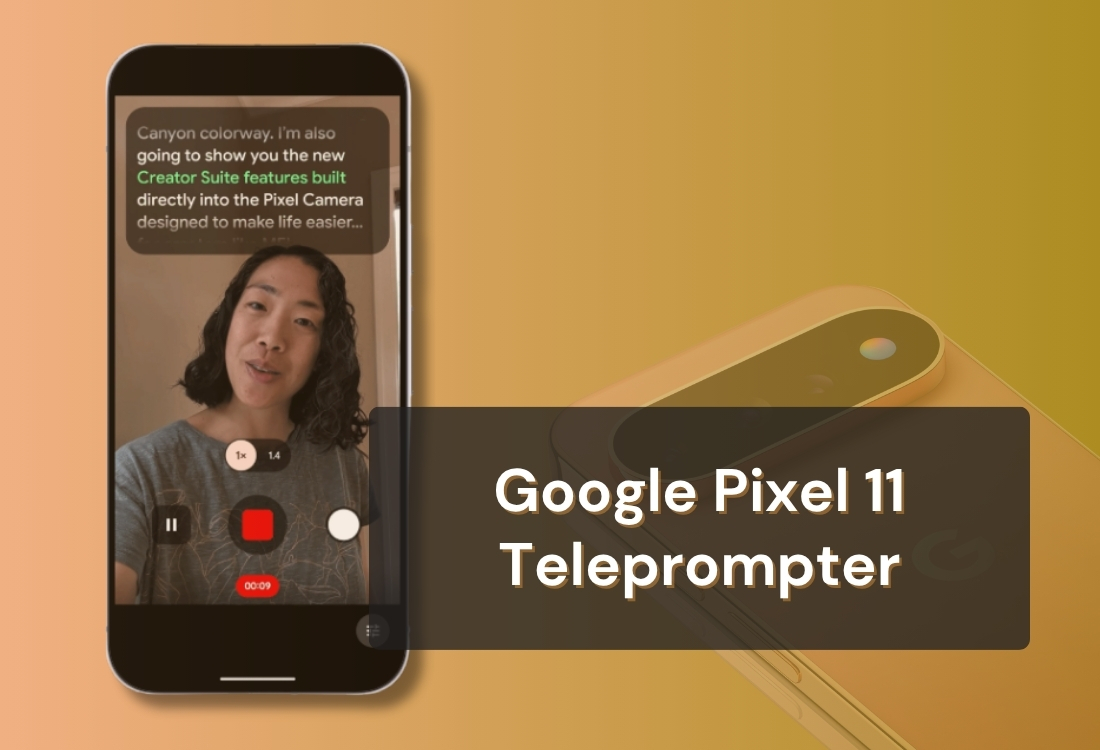


Google announced the Pixel 11 lineup on August 12, 2026, and tucked inside the Camera app is something creators have wanted from a phone maker for a long time: a built-in teleprompter that scrolls when you talk. It sits in a new Creator Suite tab, it costs nothing extra, and it needs no second device.
So here is the question we got asked roughly forty times in the twenty-four hours after the keynote: does the Pixel 11 teleprompter make a dedicated teleprompter app pointless?
We build one, so weigh our opinion accordingly. But the honest answer is that it depends almost entirely on one thing: whether your script is disposable. For a quick selfie clip you will never film again, the Pixel teleprompter is good, and we would tell you to just use it. The moment your script is something you keep, reuse, or shoot with anyone else or any other camera, you run into hard walls, and they arrive faster than you would expect. Here is exactly where they are.
The teleprompter is one of five tools in what Google calls Creator Suite, a new section of the Pixel Camera app aimed at people filming for YouTube, TikTok and similar platforms.
It lives in a new tab inside the Camera app's video settings. Android Authority calls it the "Creators tab"; Engadget and others describe it as a new Creator tab in video settings. The Pixel 11 also lets you set video as the default mode when the Camera app opens, which tells you how much Google expects people to live in this part of the app.
Credit where it is due: this is the strongest phone-native teleprompter anyone has shipped. In Google's words it is "an on-screen teleprompter that dynamically scrolls as you talk" so you can "speak at your own pace and never miss a word."
Android Authority describes the behaviour precisely: the text "auto-scrolls as it hears you speak and automatically adjusts to your cadence, while also observing any pauses." It is speech-tracking, not a fixed-speed crawl. Slow down for emphasis and it waits. Speed up and it keeps up. Engadget's hands-on reports that it "worked flawlessly, easily understanding and keeping pace with what I was saying."
Android Authority's read is that Google's version beats the built-in prompters Xiaomi and vivo have shipped for several generations, because those "lack the adaptive speed controls that Google now offers." That matches our expectation. Voice-tracked scrolling is the same principle behind VoiceGlide, and Google has the speech models to do it well.
If you only remember one thing from this post: the scrolling engine is not the problem. Everything around it is.
Creator Suite ships across the new lineup, including the base model: Google's own Pixel 11 store page promises you can "reduce retakes using Teleprompter." Preorders opened August 12, 2026, with retail availability from August 20. The Pixel 11 starts at $899, the 11 Pro at $1,099, the 11 Pro XL at $1,299 and the 11 Pro Fold at $1,899.
For everyone on an older phone, this is the sentence that matters. Android Authority reports that Creator Suite "is limited to the new phones for now" and that "Google says it will evaluate whether it's possible to bring the features to older devices but doesn't guarantee anything yet."
So if you own a Pixel 10, a Pixel 9, a Samsung or an iPhone, this is not a feature you have. It is a reason to buy a phone.
These are not nitpicks. Each one is the kind of thing you discover twenty minutes into a real shoot.
The Pixel teleprompter holds a single script at a time. You type it or paste it into the Camera app, film, and that is the end of its life. There is no saved library, no naming, no editing later, no file import, no pulling from Google Docs or Drive, and no syncing to anything.
For a story reply, fine. For a course with eighteen modules, a client's four-video package, or a weekly show with a recurring intro, this is the whole ballgame. Scripted work is not one script, it is a library you return to. Writing on a phone keyboard inside a camera app is also not where anyone wants to draft.
The teleprompter works with the selfie camera and nothing else. You cannot prompt while filming on the rear array.
Think about what that costs you. You have just bought a phone whose entire camera pitch is about the main sensors, and the one mode where you are reading a script, which is to say the mode where you most want to look composed and professional, is locked to the front-facing lens. Anyone who wants a scripted piece shot on the good camera has to prompt from something else: a second phone, a tablet, a laptop, or a rig. Which is a shame, because a foldable reading from the inner screen while shooting on the rear camera would have been the best no-accessory prompter setup on any phone. That is a real workflow, and you can do it today, just not with Google's prompter.
You can make the text bigger or smaller. That is the entire customization surface. No font choice, no colour or contrast control, no opacity, no adjustable text position or line spacing.
That is fine for most people and a hard stop for some. If you read better in OpenDyslexic or Lexend, or you need higher contrast, or you are working in Hebrew or Arabic and need right-to-left layout, the Pixel prompter has no answer for you.
The voice tracking is excellent, and it is the only mode. There is no manual speed slider, no fixed-speed option, no timed scroll, no words-per-minute setting.
Most of the time that is fine. It stops being fine when you are recording a 45-second ad read that has to land at exactly 45 seconds, when you are in a room with other people talking, when you are doing a two-hander where someone else has lines, or any other situation where speech detection has something to get confused by. A prompter with no manual override is a prompter you cannot rescue mid-take.
Three separate limits that all bite the same group of people, which is anyone doing this semi-professionally.
No mirroring. Not horizontal, not vertical. If you use a beam-splitter rig, text has to be flipped to read correctly through the glass, and the Pixel prompter cannot do it. That rules it out of hardware prompting entirely.
No remote control. You have to be at the phone. No clicker, no Bluetooth keyboard, no foot pedal, no watch. Fine alone at a desk; awkward the moment you are standing back from the camera or someone else is running the shoot.
Pixel Camera app only. There is no system-wide overlay, so you cannot prompt while recording natively inside TikTok, Instagram or anything else. You shoot in the stock camera and upload afterwards.
Three things we genuinely do not know yet, and we would rather say so than guess: which languages the voice tracking supports, whether there is a practical ceiling on script length, and whether the speech model runs on-device or needs a connection. We will update this post as that becomes clear.
Skipping this section would be the easy thing to do. It would also be wrong.
If you are filming a 30-second update, a quick product mention or a story reply, your script is not a document. It is a note you will never open again, the front camera is the right camera anyway, and every limitation above costs you nothing. Open the camera, tap the Creator tab, talk. A separate app is more overhead than the video deserves.
The best tool is the one you actually use. A prompter inside the app you already open reflexively gets used on days when a separate app would not. No account, no download, no subscription, no watermark question. If it gets you filming twice as often, that beats a better tool you skip.
Worth saying plainly, because it is the thing they got right: the speech tracking is as good as anything in the category, and it is free, and it is built into a phone. That is a real achievement and it will make a lot of ordinary videos better.
The social media gridlines are the underrated feature of the whole suite. Knowing exactly where Instagram's caption block will land before you film prevents a specific, common and infuriating mistake, and paired with the audio visualizer it catches the two problems that ruin more videos than fumbled lines do.
We will be honest: we do not have a composition overlay like that today. It is on our roadmap and we are building it, partly because Google is right that creators need it. Until we ship it, that one is theirs.
Everything above is about a phone feature doing a phone feature's job well. Here is the other side.
Teleprompter.com stores unlimited saved scripts, syncs them across your devices, and imports from TXT, Word and PDF as well as Dropbox, Google Drive and iCloud. Write on a laptop, film on a phone, come back to version three next Tuesday. If your work involves more than one script, this difference outweighs everything else on this page.
You can prompt on the front or rear camera and switch between them mid-recording without pausing. On a foldable that unlocks the setup the Pixel's own prompter cannot do: read from the inner screen while filming on the rear array, no rig, no second device, and the good glass pointed at you.
VoiceGlide for conversational delivery, fixed speed when the room is noisy or someone else is talking, timed scrolling when the video has to hit an exact runtime, and words per minute when you are pacing narration to a target. Different shoots need different modes, and having a manual option means a take is never unrecoverable.
Horizontal and vertical mirroring, so a phone or tablet works as the source for a beam-splitter rig in front of a real camera. Our teleprompter setup guide covers that end of the spectrum in detail.
Bluetooth keyboards, presentation clickers, game controllers, foot pedals, MIDI controllers and Wear OS watches all work as remote controls, and paid plans let you preview and drive the script from a second device. This is the difference between filming at your desk and filming on a set.
OpenDyslexic and Lexend, custom fonts and colours, adjustable margins, Bionic Reading, and right-to-left support for languages like Hebrew and Arabic. For a lot of people this is not a preference, it is whether they can use a prompter at all.
Teleprompter.com runs in any browser and on iOS, Android and macOS. The Android app has 500,000+ downloads and a 4.6 rating from over 10,000 reviews on Google Play. Mixed iPhone and Android team, occasional prompting from a laptop, or simply not spending $899 this month: a device-locked feature does not solve any of that.
Depending on plan: 4K recording with no watermark, background blur and replacement, automatic subtitle generation, clean audio, an AI script generator, and resizing for YouTube, Instagram, TikTok and LinkedIn. The Pixel counters with better camera hardware, Speech Enhancement and Storyboard. Which stack wins depends on whether your bottleneck is the script or the picture.
There is also a sensible middle path we would actually recommend to Pixel 11 owners: use both. Write and store your scripts in Teleprompter.com where they live permanently, then paste a short one into the Pixel prompter when you just want to shoot a quick selfie clip. Owning a Pixel 11 does not oblige you to pick a side.
If you are new to reading on camera at all, our talking head video guide covers the delivery side, which matters more than any feature list.
Yes. The Pixel 11, 11 Pro, 11 Pro XL and 11 Pro Fold include a teleprompter inside a new Creator Suite tab in the Camera app's video settings. It scrolls as you talk, adapting to your pace and pauses.
No. It is front camera only. If you want to prompt while filming on the rear array, including on the Pro Fold where you could read from the inner screen, you need a separate teleprompter app.
It is included with the phone at no extra cost. The Pixel 11 starts at $899, the 11 Pro at $1,099, the 11 Pro XL at $1,299 and the 11 Pro Fold at $1,899, with retail availability from August 20, 2026.
No. It holds one script at a time, typed or pasted directly into the Camera app. There is no saved library, no file or Google Docs import, and nothing persists after you finish filming. If you reuse scripts, you need an app with cloud storage.
You can change the size. That is all. There is no font selection, colour or contrast control, opacity setting, or adjustable text position, and no accessibility fonts or right-to-left language layout.
No. Scrolling is entirely voice-driven, with no fixed-speed, timed or words-per-minute fallback. In a noisy room or a multi-person shoot, there is no manual override.
No. It only works inside the Pixel Camera app. You film in the stock camera and upload afterwards. A separate teleprompter app is the only way to prompt while recording natively in another app.
No. There is no remote control support of any kind, so you need to be within reach of the phone.
Not at launch. Creator Suite is limited to the Pixel 11 series. Google has said it will evaluate bringing the features to older devices but has not committed to it.
Its voice tracking is excellent and for a one-take selfie clip on a Pixel 11 we would happily use it. For saved scripts, rear-camera filming, timed or fixed-speed scrolling, mirroring, remote control, accessibility fonts, third-party apps or any non-Pixel device, a dedicated app like Teleprompter.com does considerably more.
Teleprompter.com is our answer, and we are biased, so weigh it accordingly: free plan, 500,000+ Android downloads, 4.6 stars from over 10,000 reviews, four scroll modes, unlimited saved scripts and broad remote-control support. It runs on any Android phone, not just this year's Pixels.
Phone makers shipping teleprompters is good news. Google's voice tracking is the best any phone has shipped, and the composition gridlines are a genuinely smart addition that we intend to match.
But it is a prompter, not a script workflow. Front camera only, one script at a time, font size as the only control, voice scrolling with no fallback, no mirroring, no remote, no third-party apps, and only on phones released this week. Those are not gaps that get filled by a review cycle; they are the shape of the product. For a lot of casual selfie filming that shape is exactly right, and you should use it.
If you shoot short and loose, enjoy the new phone. If you shoot scripted, repeatable work, start free with Teleprompter.com on the device you already own, and see the pricing page if you need 4K without a watermark, subtitles or clean audio.


.png)


.png)