

Video teams argue about story vs script because both solve real problems. Storytelling builds attention and trust. A script protects clarity, timing, and accuracy. If you publish for YouTube, TikTok, webinars, product pages, or internal comms, the choice affects everything from audience retention to editing time.
This guide breaks down story vs script using a practical framework, real use cases, and a step-by-step workflow you can follow on your next shoot. You’ll also get specific writing tips that make your delivery sound natural, plus a simple way to rehearse with a teleprompter.
In video content, a story is not limited to movies or brand films. It’s the sequence of meaning that keeps someone watching. A viewer starts in one mindset, feels a shift, then leaves with a clearer belief or next step. That’s the narrative arc, even when the topic is a product demo or a tutorial.
A useful way to treat story is as a promise plus momentum. You set a clear expectation early, then keep paying it off with concrete beats: a relatable problem, a turning point, a proof point, a satisfying resolution. When that progression exists, viewers feel guided instead of dragged through information.
Story also tends to create stronger audience connection. That matters because video is crowded. Recent Hubspot reporting highlights how central video is to marketing strategy, with 93% of marketers cited as viewing video as vital to their overall strategy.
A video script is the planned language you intend to say on camera. It can be word-for-word, or it can be structured as beats with key phrases. Either way, it gives your message shape. It reduces rambling, keeps the pacing consistent, and makes it easier to record multiple takes that match.
A script also supports repeatability. If you need versions for different platforms, multiple spokespeople, or a series that stays consistent week to week, a script makes that possible. Editors love it, too, because clean structure means fewer jumps, fewer trims, and faster cuts.
The most useful way to think about story vs script is to treat them as tools that solve different production problems. Story builds attention and meaning. Script protects clarity and efficiency. Your job is to pick what leads for this video, then support it with the other.
Some formats succeed when viewers feel an emotional throughline early. In these videos, the story creates the reason to care before the viewer decides to leave.
Story-led formats often include:
In these cases, it usually starts with a story because the opening moment must earn attention. A tight hook works better when it’s connected to a real human payoff, not a generic intro. Write the first 10 to 20 seconds as a “moment of truth” that makes the viewer lean in. Then bring in structure so the rest of the video stays clear.
Other formats succeed when the viewer wants clarity fast. They came for steps, proof, and a clean explanation. That is where script-led work shines.
Script-led formats often include:
Here, it often favors script because accuracy matters. Your words carry claims, numbers, instructions, or positioning. The script protects those details and keeps your runtime predictable.
A lot of modern video content wins with a hybrid. You open with story to create attention and relevance. You use a script to deliver the core explanation with precision. You close with a story beat that gives meaning and motivation.
That hybrid flow is one reason short-form performs well when it is focused. Wyzowl’s long-running survey data shows many marketers report success with short-form video, with 30–60 seconds named as the most effective length by the largest share in their report.
If you want an easy way to decide between story and script without overthinking it, score your video on two needs: clarity and emotion.
Clarity needs are high when:
Emotion needs are high when:
Once you see which need is higher, your decision becomes obvious. When clarity leads, script-led planning keeps things tight. When emotion leads, story-led planning keeps people watching. Then you add the other tool as support, so the video still feels natural and purposeful.
This is the practical center of story vs script. You’re not choosing a side. You’re choosing a lead strategy.
A fast way to avoid bland videos is to build a story spine before you write the script. That spine is not a dramatic tale. It’s a structured promise that keeps your content moving.
Three structures work especially well for marketing videos, training, and creator education:
Before → After → Bridge
Start with the viewer’s current pain. Show the outcome they want. Then explain the bridge: the method, tool, or steps that get them there.
Problem → Pressure → Fix
Name the problem in plain language. Describe the pressure it creates in work or life. Deliver a fix that feels realistic and immediate.
Situation → Complication → Answer
Set the context. Add the twist that makes it tricky. Provide the answer as a clear plan.
The spine gives your video meaning and momentum. A viewer can sense where the content is going. That alone improves perceived quality, even before you polish your visuals.
When you’re stuck, use these prompts as a first draft. Keep them ugly. Keep them honest. You can refine later.
Once you write those sentences, the rest of the video becomes much easier to outline and script.
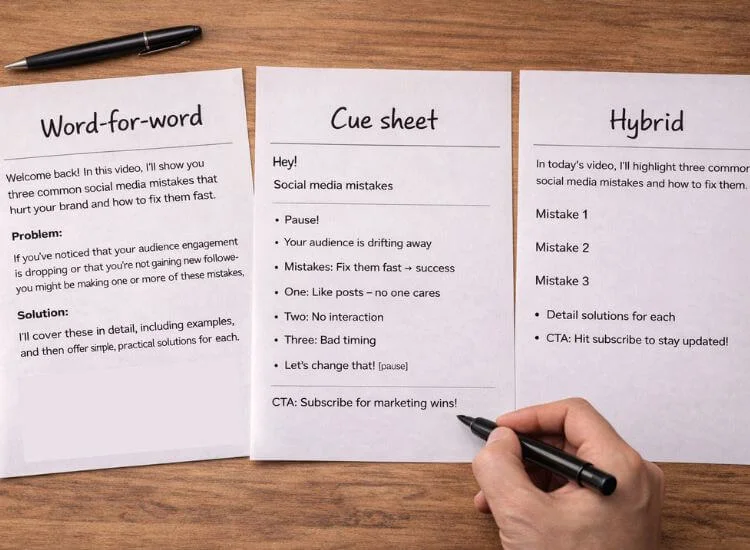
A script can sound natural when it’s written for speaking, not reading. That starts with format choice.
This is a strong middle path in the story vs. script debate because it keeps the feel of a story while giving your delivery more structure. If you already have rough beats in your outline, you can use the AI script generator for turning story beats into a spoken video script to shape them into something speakable, then refine the wording to match your tone.
Speakable writing has a few habits that matter more than fancy vocabulary.
Write in short sentences. Use contractions if that matches your brand voice. Prefer concrete verbs over abstract phrasing. Say the point, then move on. Your viewer has a scroll thumb and a short attention window.
A practical editing pass is to read your script out loud and mark any line that makes you stumble. If your mouth trips, your viewer’s attention drops. Rewrite those lines until your voice flows.
Seeing examples makes the difference between story and script much clearer, especially when they are presented in the actual formats people use for publishing.
Open with a specific moment the viewer recognizes. Keep it personal and quick.
Instead of introducing yourself, start with the friction.
“I recorded the same intro seven times and still sounded unsure.”
Then give the turning point.
“The fix was writing three beats, not a full paragraph.”
Then give a crisp action step. Close with a clear payoff.
“Try it once, then record your second take immediately.”
This works because the story spine creates relevance fast, and the tiny script structure makes the advice actionable.
A product demo often succeeds when the viewer can follow steps without guessing. Start with one sentence on the outcome. “In the next 90 seconds, you’ll set up your script, adjust speed, and record a clean take.”
Then move through steps with simple transitions. Avoid long detours. Keep your claims accurate. This style reduces editing because your structure creates clean cut points.
According to Video Marketing Stats (2026) of Wyzowl, many marketers attribute real outcomes to video, including improved brand awareness and user understanding in their survey data. That value comes through most clearly when your demo is easy to follow.
Start with a story-led hook that frames the problem in human terms. Then shift into a script-led explanation with a clear sequence.
Close with a meaning-driven reminder that connects the “how” to a real outcome, like confidence, saved time, or better performance on camera.
A teleprompter helps you get the best of both sides of the story and script debate. You keep the clarity of planned wording while maintaining strong eye contact, which makes you look more confident and present on camera.
That mix is especially useful when you need to sound natural but still say the right things, in the right order, without drifting off-track.
A teleprompter is especially helpful when you’re recording:
To avoid sounding stiff, don’t load the screen with dense paragraphs. Use a beat-style script instead. Keep each line short, add intentional pauses, and include a few emphasis cues that match how you speak. Rehearse once for meaning, then record at a steady pace so your delivery stays conversational.
If you want to make your message clearer in one take, get started with Teleprompter.com and turn your next script into a confident delivery that’s easier to record and even easier to edit.

A repeatable workflow keeps quality high even when you’re producing weekly.
1. Decide story vs script using the clarity–emotion score
Pick the lead approach in a minute. Write one sentence on the viewer’s goal and one sentence on the action you want them to take.
2. Draft a one-minute version first
Write the story spine as a short paragraph. Then list three key beats. This becomes the backbone for your script and your edit.
3. Expand into your chosen script format
If you need precision, write word-for-word. If you need natural delivery, write beats. If you want both, script the opening and close, then use beats in the middle.
4. Rehearse for flow, then cut friction
Record a rough take and edit for clarity and flow. Rewrite stiff, long, or stumbling lines in simpler language. Warm up your voice before the final take for steady pacing and clear delivery. Finally, time the script to confirm the runtime.
5. Record clean versions for multiple platforms
Create one standard version, then trim into shorter cuts. Your structure makes those trims easy because your sections already have clear boundaries.
This is the operational version of story vs script. It turns the concept into a production system.
Choosing between story vs script works best when you treat it as a production choice tied to your goal. Story gives your video meaning and momentum. Script gives your message clarity, pacing, and consistency. Most teams get the best results by leading with one, then supporting it with the other.
For a smoother recording process, build a story spine first, write a speakable script format, then rehearse with pacing that matches your voice. If you’re already using Teleprompter.com carry that same structure into every video so your delivery stays confident, your eye contact stays steady, and your edits stay simple.
A story provides meaning and emotional flow for viewer engagement. A script offers precise wording and structure for clear, timed, and accurate delivery. The best videos combine a compelling story foundation with a detailed delivery script.
Use a script if you need clear structure, tight pacing, or repeatable takes. Use a beat script if you want a natural tone while staying on-message. For educational YouTube content specifically, a combination is often most effective: start with a compelling story hook and then use scripted key points for the core information.
Start with the story. Define the viewer problem, the payoff, and the turning point so the video has direction. Then write the script to deliver that path with clean wording and timing. This order makes the story and script feel aligned instead of competing.
Yes. A story can be written as a script once you decide the beats and the message you want to land. The story is the sequence of meaning, while the script is the words you’ll say on camera. The best scripts usually follow a clear story arc.
Write for speaking, not reading. Use short lines, simple words, and a beat-style format with planned pauses. Rehearse until the ideas feel familiar, then record while keeping steady eye contact. This approach helps you balance the flow of your story with the structure of your script, ensuring your presentation sounds natural, not stiff.


.png)


.png)