

The rise of video-first communication has made teleprompter apps essential for creators, educators, marketers, and professionals. In 2026, the challenge is no longer finding a teleprompter; it’s finding one that is actually usable for free without hitting restrictive limits.
Below are the best free teleprompter apps in 2026, explained in detail.
Teleprompter.com is the most complete and versatile free teleprompter solution available today. It is designed for creators who need a reliable tool across different devices without sacrificing quality or ease of use.
Unlike basic browser-based tools, Teleprompter.com supports a full production workflow, from script creation to on-camera delivery. It works across web, iOS, Android, and Mac, making it highly flexible for creators who switch between mobile and desktop recording.
Key Features:
This combination of accessibility and workflow depth makes it one of the few teleprompter tools that works equally well for beginners and advanced creators.
⭐ What users say (Customer Reviews)
Real users consistently highlight ease of use, reliability, and time savings:
Limitations:
Why it ranks #1:
In short, Teleprompter.com is the most complete free teleprompter app in 2026.
CuePrompter is a lightweight browser-based tool designed for instant use. It requires no login, no installation, and no setup.
It is ideal for users who just want to paste a script and start reading immediately without extra features or configuration.
Key Features:
Limitations:
CuePrompter is best for quick, one-off use rather than professional production.
EasyPrompter improves on basic browser tools by adding simple customization options. It remains browser-based but gives users more control over readability.
Key Features:
Limitations:
It is a good middle-ground option for casual users.
VoiceScroll is a mobile-first teleprompter built around speech recognition. It automatically scrolls text based on how you speak, making delivery feel more natural.
Key Features:
Limitations:
It is best suited for presenters who want a conversational speaking flow.
FlowPrompter is designed for educators, trainers, and professionals who present on video calls or record tutorials.
Its key feature is an “invisible script window” that stays hidden during screen sharing or recording.
Key Features:
Limitations:
FlowPrompter is best for structured presentations and remote teaching.
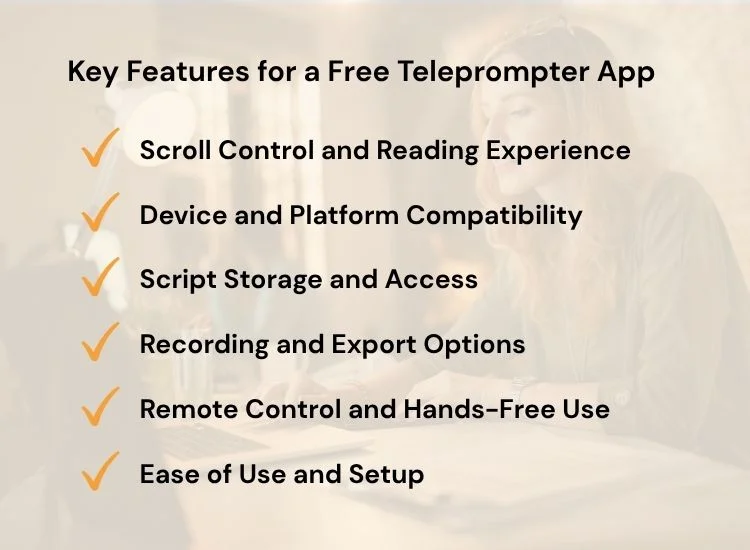
Choosing a free teleprompter app is not just about finding something that scrolls text. The quality of your on-camera delivery depends heavily on how well the app supports your workflow, especially if you create content regularly.
Here are the most important factors to consider before choosing an app:
A good teleprompter should adapt to your speaking style, not force you to match its speed. Look for options like adjustable speed, timed scrolling, or voice-activated scrolling that follows your natural delivery. This helps reduce mistakes and makes your speech sound more natural.
Check whether the app works on the devices you actually use for recording. Some tools are browser-only, while others are mobile-first or desktop-only. The best options support multiple platforms so you can switch between phone, tablet, and computer without losing access to your scripts.
If you record frequently, script management becomes essential. Some free tools reset your content every session, while others offer cloud-based storage or account syncing. Having saved scripts makes it easier to edit, reuse, and organize your content over time.
If you plan to publish videos, check whether the app supports recording features and what limitations exist. Some free plans may include watermarks or restrict export quality, while others focus only on script scrolling without recording.
For solo creators, remote control options can make a big difference. Features like keyboard shortcuts, foot pedal support, or game controller integration allow you to control playback without touching your device during recording.
A strong teleprompter app should be simple enough to start using immediately. Avoid tools that require complex setup if your goal is quick and efficient recording. The best apps reduce friction so you can focus on delivery, not configuration.
The best free teleprompter app is the one that matches your workflow, supports natural delivery, and works consistently across your devices.
Free teleprompter apps in 2026 now range from simple browser tools to full cross-platform platforms built for professional video creation. The right choice depends on how you record, how often you create content, and how much control you need over your workflow.
Teleprompter.com stands out as the best free teleprompter app in 2026 because it combines ease of use with a complete recording experience across web, mobile, and desktop. It offers a strong balance of simplicity and functionality, making it suitable for both beginners and experienced creators.
Start creating smoother, more confident videos today. Try Teleprompter.com for free on web, iOS, or Android and begin recording with a workflow built for real content creation.
To explore more teleprompter options based on your device and workflow, check out our detailed guides for iPhone users and Windows setups:
The best free teleprompter app in 2026 is Teleprompter.com because it works across web, iOS, Android, and Mac, supports smooth scrolling, and includes cloud script storage and multiple recording modes. It is more complete than browser-only tools that lack cross-device support or script management.
Yes, there are several good free teleprompter apps in 2026. The strongest option is Teleprompter.com, followed by simpler tools like CuePrompter and EasyPrompter. The best choice depends on your needs, professional recording, quick script reading, or basic browser use.
Yes, some free teleprompter apps do not impose strict character limits. Browser-based tools like CuePrompter and EasyPrompter allow long scripts without enforcing hard limits. However, they may lack advanced features such as cloud saving or voice control. More advanced apps like Teleprompter.com may focus on workflow features instead of restricting script length.
Teleprompter.com is one of the few free teleprompter apps that works on both Android and iOS, as well as on the web and on desktop. Many other free tools are limited to either browser-only use or a single mobile platform.
Yes, teleprompter apps are widely used for YouTube videos. Apps like Teleprompter.com are especially useful because they support smooth scrolling, script management, and cross-device recording, making it easier to deliver natural on-camera presentations.
Some teleprompter apps offer offline functionality, especially mobile-based ones. However, many browser-based tools require an internet connection. Apps with cloud syncing, like Teleprompter.com, may require internet for saving or syncing scripts but can still support offline.


.png)


.png)