


A good click-through rate on YouTube sits between 2% and 10%, according to YouTube's own creator data. But that single range hides more than it reveals. Your CTR depends on where the impression came from, what niche you're in, and how big your channel already is. Compare yourself to the wrong benchmark and you'll chase problems that don't exist.
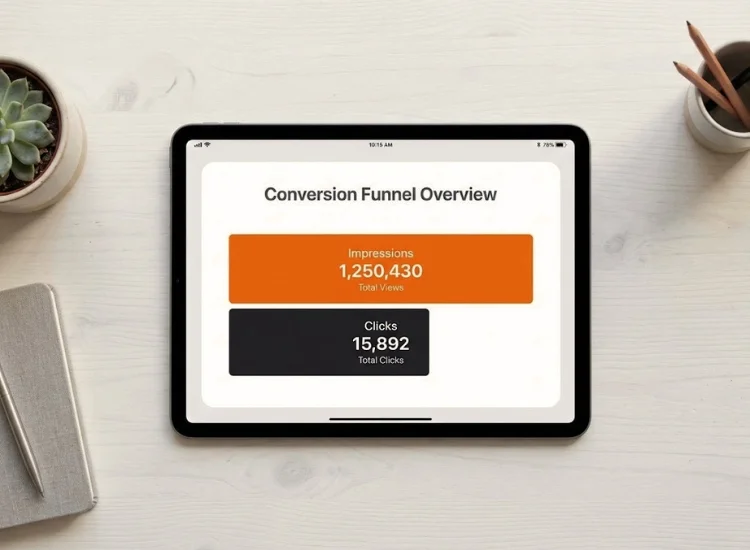
Click-through rate measures the percentage of people who click your video after seeing the thumbnail, not the percentage who watch it all the way through. YouTube counts each thumbnail appearance as an impression, in search results, the home feed, or a suggested video slot.
The formula is simple: CTR = (Clicks ÷ Impressions) × 100.
If YouTube shows your thumbnail 1,000 times and 50 people click, your CTR is 5%. That 5% tells you nothing about how many of those 50 people finished the video, subscribed, or left after ten seconds. CTR measures one decision only: did the thumbnail and title earn the click.
Everything that happens after the click, watch time, retention, and engagement—is a separate set of metrics you'll find alongside CTR in YouTube Studio.
This distinction matters because a lot of creators panic over a "low" CTR when their real issue is retention or celebrate a high CTR that's actually hurting them. More on that below.
Half of all channels and videos on YouTube see an impressions CTR between 2% and 10%, and this range comes directly from YouTube's own Help Center, not a third-party estimate (Source: Impressions & click-through-rate FAQs, YouTube Help Center, 2026). If your CTR sits in that band, you're performing in line with half the platform. For more context on how that fits into the bigger picture, see our breakdown of YouTube platform statistics and growth trends.
Newer channels, videos under a week old, and videos with fewer than 100 views can swing well outside that range in either direction, simply because the sample size is too small to mean much yet. YouTube's own guidance is explicit on this: avoid checking CTR immediately after uploading, and avoid reacting to small day-to-day swings that aren't statistically significant.
There's also a structural reason smaller channels often post higher CTR. YouTube's Help Center notes that videos with fewer impressions and views tend to show higher click-through rates because they're reaching a narrower, more loyal audience, your subscribers and recent viewers, rather than a broad, unfamiliar one. A big channel's CTR isn't "worse." It's diluted across a much bigger, less targeted audience.

Your overall channel CTR is really an average of several very different numbers, and where your impressions come from changes the benchmark completely. Independent 2026 benchmark research puts organic YouTube CTR at these typical ranges by source (Source: Average YouTube CTR: Organic & Paid Benchmarks, Focus Digital, 2026):
If your overall CTR is 5% but your search traffic converts at 12% and your browse traffic sits at 2%, you don't have a general CTR problem. You have a home-feed packaging problem specifically. Check the traffic source breakdown in YouTube Studio before changing anything, because fixing the wrong lever wastes a redesign cycle on thumbnails that were never the issue.
Different content types carry different built-in expectations. Gaming and entertainment content typically runs on the higher end of the range, since thumbnails in those niches have more visual variety to work with and audiences browse more impulsively.
Educational, how-to, and B2B content typically runs lower, not because the content is weaker, but because that audience is evaluating a specific need rather than scrolling for entertainment. A modest CTR on a detailed tutorial can still be a strong result if the audience it attracts sticks around and finishes watching.
Channel size follows a similar logic to traffic source. Smaller channels concentrate their impressions among engaged subscribers, so CTR runs higher. As a channel grows and YouTube starts showing it to broader, colder audiences, CTR naturally settles lower even while total views climb.
Watch the relationship between the two numbers, not either one in isolation. If impressions are growing and CTR is holding steady or dropping only slightly, that's healthy expansion. If impressions double and CTR drops by half, your total views stay flat, and that's worth investigating.
Three factors do most of the work: your thumbnail, your title, and how well the topic matches what your audience actually wants.

High-contrast images, clear text, and one focal point beat cluttered thumbnails every time. Consistency also compounds: viewers who recognize your visual style at a glance click faster than viewers seeing your channel for the first time. Check the guide on how to make good thumbnails; it breaks down the specific design choices that hold up at small sizes.

A strong title pairs clarity with curiosity. It should promise something specific rather than something vague, and it needs to hold up on mobile, where titles get cut off past a certain length. If you're testing multiple angles fast, the AI video title generator gives you several options to compare before you commit to one.
The best thumbnail out there won't save a topic your audience doesn't want. Use your own YouTube channel analytics to spot which past uploads overperformed and look for the pattern, a format, a subject, or a specific angle you can repeat with something fresh.
Open YouTube Studio, go to Analytics, then Reach, and look under "Impressions and how they led to watch time" for your average CTR, broken out by traffic source. Compare videos over weeks or months, not day to day.
YouTube's own guidance flags three specific mistakes to avoid: judging CTR before you have enough impressions, reacting to small variations that aren't statistically significant, and testing multiple thumbnails or titles on the same video, since differences in results are often caused by shifting traffic sources rather than the creative change itself (Source: YouTube Help Center, 2026).
If you're setting up your workflow for the first time, check our guide on YouTube Studio setup; it walks through the full analytics dashboard step by step.
A misleading thumbnail can spike your CTR in the short term, but YouTube's recommendation system watches what happens next. According to YouTube's own Help Center, videos with high CTR but low average view duration are a signal of clickbait, and clickbait content tends to get recommended less, not more, because low view duration tells the algorithm that viewers weren't satisfied with what they got.
That means a 10% CTR followed by viewers leaving in the first ten seconds is a worse outcome for your channel's growth than a steady 5% CTR paired with viewers who stay and watch. The second pattern builds the kind of trust with YouTube's system that leads to sustained recommendations over time, not just a short-lived spike.
There's no single number that makes your YouTube CTR good or bad. The 2% to 10% range from YouTube itself is a solid starting point, but the benchmark that actually matters is the one built from your own traffic sources, your own niche, and your own channel's history. Track the trend, not the snapshot. If your search CTR is strong but your browse CTR lags, you know exactly where to focus your next thumbnail redesign instead of guessing.
And once your packaging earns the click, make sure your delivery holds up to what it promised. A clear, confident opening keeps viewers watching past the moment they decided to trust you.
Half of all channels and videos see an impressions CTR between 2% and 10%, per YouTube's own Help Center. Where you fall in that range depends heavily on traffic source, niche, and channel size, so compare your number against your own history and similar creators, not a single universal target.
Divide your total clicks by your total impressions, then multiply by 100. YouTube Studio calculates this automatically under Analytics, so you won't need to do the math yourself, but understanding the formula helps you interpret why the number moves.
This usually happens when a video gets most of its impressions from a narrow source, like your channel page or a small subscriber base, rather than broader placements like Browse Features or Search. High CTR with low overall impressions is not a problem to fix, it simply reflects a smaller, more targeted audience.
No. As your channel grows and YouTube shows your videos to wider, less familiar audiences, CTR naturally settles lower even as total views rise. Watch how fast CTR is dropping compared to how fast impressions are growing. If both move together, your reach is expanding in a healthy way.
Shorts don't use a click-through model the way long-form videos do. Viewers swipe past or stop, so the comparable metric is swipe-away rate rather than CTR. Standard CTR benchmarks don't transfer directly to the Shorts feed.
Weekly is enough for most creators. Checking daily encourages reacting to noise before impressions have had time to accumulate into a statistically meaningful number.


.png)


.png)