What Is a Teleprompter? How It Works and Why You Need One
By
Teleprompter.com team
Published on:
May 10, 2023
·
Last updated:
April 24, 2026
Reading time:
10
minutes
TL;DR:
A teleprompter is a display device that scrolls your script at a controlled pace, letting you read your lines while looking directly at the camera. Used by broadcasters, YouTubers, educators, and executives, it eliminates the need to memorize your script and cuts recording time significantly.
TL;DR:
A teleprompter displays scrolling text so you can read while facing the camera, maintaining natural eye contact.
It's used for YouTube videos, news broadcasts, presentations, lectures, and speeches.
Hardware teleprompters use a half-mirror in front of the lens, while teleprompter apps display text directly on your phone, tablet, or computer screen.
You don’t need expensive equipment. A free teleprompter app like Teleprompter.com works in your browser, on iOS, Android, or Mac, with no setup required.
Most creators see fewer retakes and more consistent delivery after just a few uses.
What Is a Teleprompter?
A teleprompter is a device or application that displays a speaker's script in a readable format directly in front of them while they record or present. The speaker reads the scrolling text while maintaining eye contact with the camera or audience, so the delivery appears natural and unscripted.
The word "teleprompter" originated in the 1950s as a brand name for the first commercial prompter system, but it has since become the standard term for all script-reading display devices. Today, teleprompters range from professional broadcast hardware to simple, free apps that run on a smartphone.
The core function stays the same across all formats: put the words where the speaker can read them without breaking their gaze.
How Does a Teleprompter Work?
Traditional hardware teleprompters reflect the script onto a half-silvered glass panel positioned in front of the camera lens. The camera shoots through the glass and sees nothing but the subject. The speaker, looking forward, sees the scrolling text reflected back at them.
Software teleprompter apps work differently. The script scrolls across the screen of your device, whether that's a phone, tablet, laptop, or monitor, at a speed you control. You position the device as close to the camera lens as possible so your eyes stay near center-frame as you read.
Both methods achieve the same result: you deliver your full script without memorizing a single line, and your audience sees confident, direct eye contact throughout.
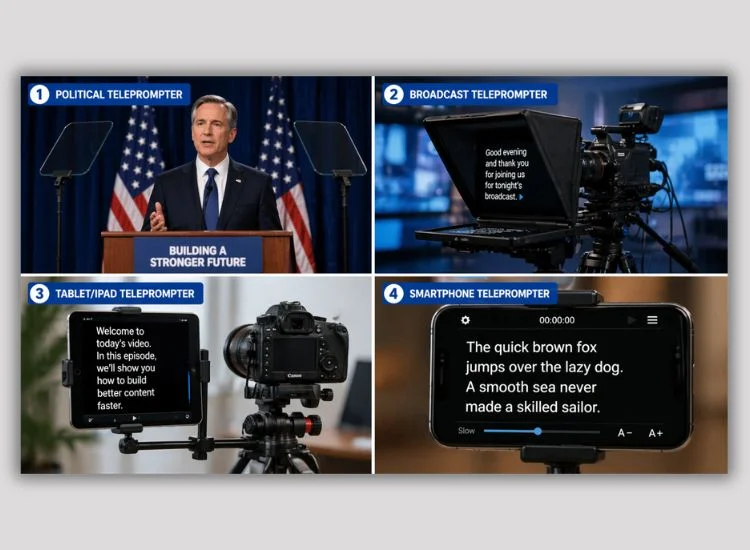
There are four main categories of teleprompters in use today. Each suits a different production context and budget.
Type
Best For
Typical Setup
Avg. Cost
Presidential / Autocue
Live speeches, keynotes, staged events
Dual glass panels flanking a podium
$2,000+
Camera-mounted (beam splitter)
Studio video, broadcast, talking-head content
Glass rig attaches in front of camera lens
$300–$1,500
Tablet / iPad teleprompter
Solo creators, field production, on-the-go
iPad in a rig next to the lens
$50–$300 (hardware)
Teleprompter app (software)
Any creator with a phone, tablet, or computer
Free or low-cost app, no extra hardware
Free–$20/mo
The presidential teleprompter is a specialized format. Two transparent panels sit at eye level on either side of the speaker, displaying mirrored text. The audience sees straight through the glass, while the speaker reads from both sides as they turn to address different parts of the room. Learn more about presidential teleprompters and how they're used.
For a complete breakdown of each category, the guide on common types of teleprompters covers how each works and when to use them.
Who Uses a Teleprompter?
Teleprompters are not just for news anchors. They're used across industries by anyone who needs to deliver scripted content clearly and confidently.
Content creators and YouTubers use teleprompters to reduce retakes, speed up production, and maintain energy across long scripts. YouTube receives over 500 hours of video uploads per minute (YouTube, 2024), and creators who record efficiently publish more consistently.
Business professionals and executives use teleprompters for recorded presentations, investor updates, and video messages where precision and polish matter.
Educators and course creators rely on them to deliver lessons to camera without a crew or a director to prompt them.
Journalists and broadcasters depend on teleprompters for speed and accuracy, especially during live delivery under deadline pressure.
Podcasters use them to read scripted intros, sponsorship reads, and structured segments while staying focused.
Why Use a Teleprompter? The Real Benefits
The most common reason people start using a teleprompter is to stop wasting time on retakes. But the benefits run deeper than that.
Fewer retakes. Recording time drops fast once you have your script in front of you. As one Teleprompter.com user put it: "My time for recording things has been cut in a quarter. This app is SO helpful for getting things right on the first take." (Parmajean, App Store review, March 2023). When you're not stopping to find your place, each take runs cleaner and your sessions wrap faster.
Natural eye contact. Looking at the camera while reading a script is what makes video feel personal. Without a teleprompter, most people either memorize (slow, error-prone) or look down at notes (breaks connection). A teleprompter solves both problems at once.
Consistent delivery. Every take follows the same script. That consistency matters for tutorials, courses, news segments, and anything where accuracy is part of the value.
Confidence on camera. Eye contact directly affects how credible you appear on screen. A study published in Criminal Justice and Behavior found that experts who maintained high eye contact were rated as significantly more credible than those with medium or low eye contact. A teleprompter makes sustained eye contact with the camera effortless. (Source: Neal & Brodsky, "Expert Witness Credibility as a Function of Eye Contact Behavior and Gender," Criminal Justice and Behavior, 2008)
Pro Tip: Start slower than you think
The most common mistake first-time teleprompter users make is setting the scroll speed too fast. Begin slower than feels natural, then gradually increase it over a few practice runs. As your pacing and delivery sync with the scrolling text, your eye movement becomes smooth and nearly invisible on camera.
What to Look for in a Teleprompter
The right teleprompter depends on your production setup, budget, and how often you record. Here's what matters most for each type.
Hardware teleprompters (camera-mounted / beam splitter): These are built for studio and broadcast use. Look for glass quality, hood size relative to your monitor, and compatibility with your camera rig. Weight matters if you shoot on a tripod. A heavier rig can affect balance and require a sturdier head.
Presidential teleprompters: Used for staged events and keynotes. Key factors are panel height and angle adjustability, font rendering at distance, and ease of transport. Most are rented rather than purchased outright, so operator familiarity with the software matters.
Tablet / iPad teleprompters: The main consideration is how close the tablet sits to the lens. A cheap rig that holds the screen too far to the side will make your eye movement obvious on camera. Also check whether the mount is compatible with your camera's cold shoe or tripod plate.
Teleprompter apps: Not all apps are built the same. These are the features that separate a functional tool from one built for professional use.
Feature
Why It Matters
Scroll modes
Speech recognition auto-adjusts to your pace. Fixed speed and fixed time give you control for scripted delivery
Offline mode
Essential for location recording without reliable connectivity
Remote control support
Bluetooth keyboards, clickers, game controllers, Apple Watch, and foot pedals keep your hands free during recording
Cross-device sync
Draft on desktop, record on mobile. Scripts should follow you across devices
4K recording with no watermark matters if you're capturing final takes inside the app
The free plan from Teleprompter.com provides instant recording capabilities without the need for extra hardware. Key features for users include various scroll modes, synchronization across devices, offline use, and compatibility with remote controls.
Knowing what not to do saves you time before you develop bad habits.
Reading instead of performing. A teleprompter shows you the words, but it can't deliver them for you. Practice the script at least once before you hit record so the words feel natural in your mouth.
Setting scroll speed too fast. Speed anxiety is real. Slow the scroll down. You can always re-record a line, but rushing through a script makes the whole take unusable.
Placing the screen too far from the lens. The further your eyes travel from the camera to the screen, the more obvious it is that you're reading. Position your device as close to the lens as possible.
Ignoring pronunciation. If your script includes names, technical terms, or words from another language, practice them before recording. A stumble in the middle of a take costs you the whole clip.
Skipping rehearsal. A single read-through before recording gives you an accurate sense of timing, catches any awkward phrasing, and reduces on-camera nerves significantly.
Start Using a Teleprompter for Free
A teleprompter is one of the simplest ways to record with more control. It keeps your script in view, helps you maintain eye contact, reduces retakes, and takes the pressure off memorizing every line. That makes it easier to focus on your message and deliver it clearly.
With Teleprompter.com, you can use an online teleprompter directly in your browser or record from the iOS, Android, and Mac apps. No extra hardware required. No complicated setup. Sign up free and record your first session today.
FAQ
What is the meaning of teleprompter?
A teleprompter is a device or application that displays a scrolling script in front of a speaker or camera operator, allowing them to read their lines while maintaining direct eye contact with the camera or audience. It is used in broadcasting, video production, presentations, and online content creation.
How does a teleprompter work?
Hardware teleprompters reflect script text onto a half-silvered glass panel in front of the camera lens. The camera films through the glass without capturing the text, while the speaker reads the reflection. Teleprompter apps display scrolling text directly on a screen positioned near the camera, achieving the same result without any hardware.
What is a teleprompter used for?
Teleprompters are used for news broadcasts, YouTube videos, online courses, corporate presentations, political speeches, live events, podcasts, and any situation where a speaker needs to deliver scripted content clearly and accurately.
Do I need expensive equipment to use a teleprompter?
No. A free teleprompter app like Teleprompter.com works directly in your browser on any device. You don't need a glass rig, a dedicated monitor, or any extra hardware to get started.
Is it hard to read from a teleprompter?
Most people adapt within one or two practice sessions. The key is setting the scroll speed to match your natural speaking pace. Starting too fast is the most common beginner error. A short rehearsal run before recording makes delivery noticeably smoother.
What is the difference between a teleprompter and an autocue?
Autocue is a brand name for teleprompter hardware commonly used in broadcast television, particularly in the UK. In practice, the terms are used interchangeably. Both refer to any system that displays a scrolling script for a speaker to read while facing forward.
Recording videos is hard. Try
Teleprompter.com
Recording a video without a teleprompter is like sailing without a compass.





.png)


.png)


