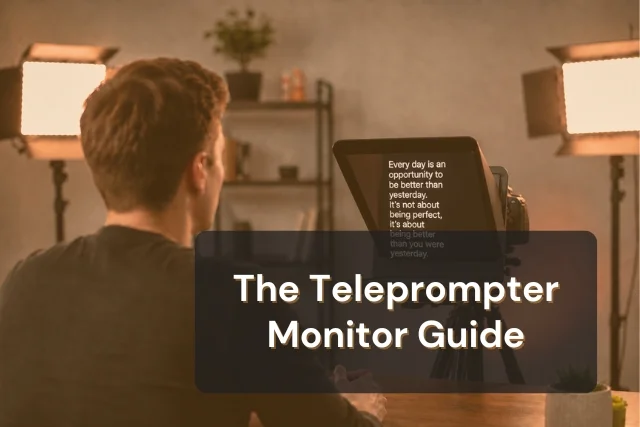


Teleprompter.com works on the screen you already have. No special hardware required. But if you're adding a dedicated camera rig or filming outdoors, knowing what monitor to pair with your setup makes a real difference between text that's easy to read and text that washes out the moment you step near a window.
This guide is for creators who are already using a teleprompter app and want to level up their rig with an external display. It covers what specs matter, what to skip, and which monitors are worth buying at each setup tier.
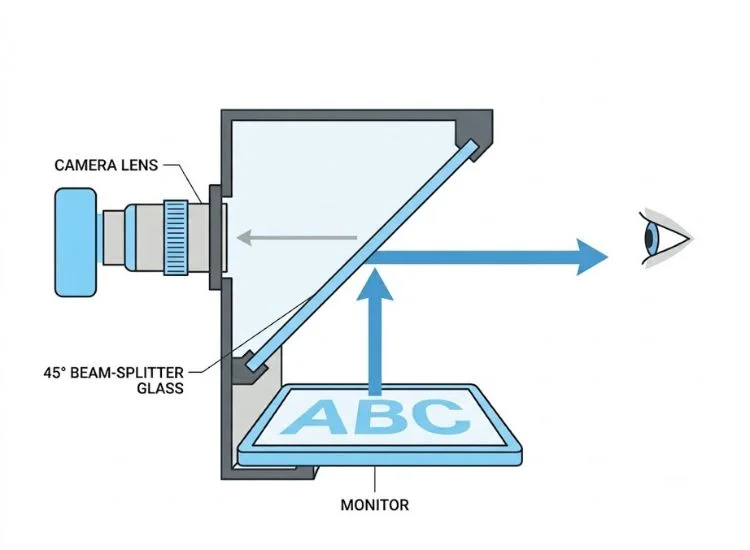
A teleprompter monitor sits behind a sheet of 50/50 beam-splitter glass. The glass reflects the text toward the speaker while staying transparent to the camera lens shooting through it. The monitor's only job is to display text clearly enough to read at a glance.
That single constraint changes what makes a monitor good or bad for this application. Resolution, refresh rate, and color accuracy barely matter. Brightness and size matter a lot.
The glass sits at a 45-degree angle inside the teleprompter hood. This limits the physical size of monitor you can fit. A standard 12-inch hood accepts monitors up to about 10 to 11 inches diagonally. Go bigger than the hood and you're either cropping your script or using a rig that becomes front-heavy and unstable on a standard tripod.
The monitor also needs proper mounting points (a 1/4"-20 thread or VESA pattern) to connect securely to a rod system or magic arm. Generic consumer monitors often lack these, which is the first place DIY setups run into trouble.
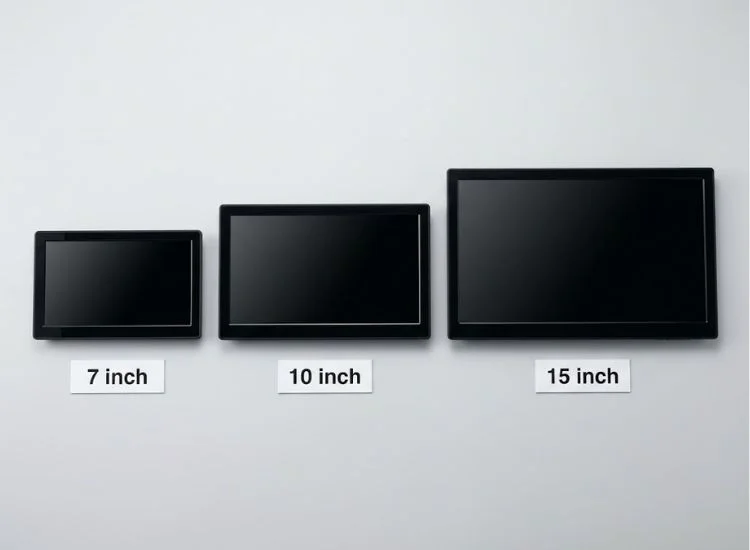
Screen size determines how many lines of script you see at once, how large your font needs to be, and how far back you can stand from the camera.
If you're filming talking-head videos at 3 to 4 feet from your camera, a 10-inch monitor is the right baseline.
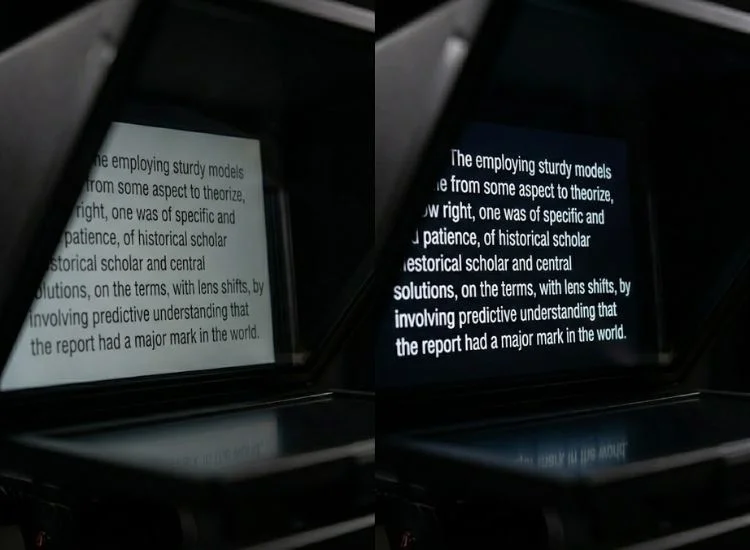
This is the one that actually determines whether you can read your script comfortably.
The beam-splitter glass cuts light transmission by around 50%. A monitor rated at 500 nits is effectively delivering about 250 nits to your eye. That's the number that needs to be bright enough for your filming environment.
Here's a practical framework:
If your filming space has strong overhead lights or natural light you can't block, plan for at least 700 nits before glass loss.
Most monitors sold today are 16:9 widescreen. For teleprompter use, that's the wrong shape.
A script is a vertical document. Lines of text stack top to bottom. A 4:3 aspect ratio monitor shows more vertical text per inch of screen diagonal, meaning more lines on screen at once, less scrolling speed needed, and a more natural reading rhythm.
A 10.4-inch 4:3 monitor shows approximately 30% more vertical script real estate than a 10-inch 16:9 monitor of the same diagonal. That directly affects how many words you can read ahead while you're speaking.
If you're buying a dedicated teleprompter monitor, prioritize 4:3. If you're using a widescreen display you already own, narrow your script column in Teleprompter.com to simulate a taller reading area.
The monitor needs a signal source: your laptop, tablet, or a dedicated script device.
One feature worth looking for: HDMI loop-through. This passes the signal from your laptop through the monitor and continues to a second display or recorder. Useful if you want to monitor your script feed at your desk while the prompter runs independently in the hood.
The R7III is a field monitor built for outdoor shoots, and its 2,800-nit brightness is overkill for teleprompter use in the best possible way. After 50% beam-splitter loss, you're left with over 1,400 effective nits. That's readable in direct sunlight.
At 7 inches it fits any compact hood. The dual L-series battery plate means you're not tethered to a wall outlet. It's heavier than a phone but significantly more reliable for a day of filming away from a studio. Street price is around $200.
Best for: Outdoor shoots, travel setups, creators who film on location regularly.
Note: Touchscreen is included but useless inside a hood. You won't pay extra for it in this model.
This is the purpose-built option. Lilliput designed the FA1045 specifically for teleprompter use with the 4:3 aspect ratio that script reading actually calls for, plus hardware-level image mirroring so your app doesn't have to handle text reversal. It mounts via standard HDMI and 1/4"-20.
For a permanent or semi-permanent home studio, this is the right choice. The 4:3 format alone gives you meaningfully more script per screen inch than any 16:9 alternative. Brightness sits around 350 nits, so it needs a light-controlled interior. If your studio has strong overhead lights or uncovered windows, pair it with blackout curtains or step up to the Feelworld option below.
Best for: Dedicated home studio setups with controlled lighting.
One of the few consumer-format monitors that ships with a hardware image flip, so text mirroring doesn't rely entirely on your teleprompter software. The 75mm VESA mount gives you flexible mounting options beyond a basic 1/4"-20 screw.
Brightness is modest (around 400 nits), so this is strictly an indoor monitor. For a home creator filming consistently indoors, it's a clean and affordable pick.
Best for: Home studio creators who want built-in text flip at a lower price point.
The PT1200 packages a purpose-built 12-inch monitor with scientific-grade American-made beam-splitter glass and a 15mm rod system. The unit breaks into three parts and folds flat for transport. At 1024x768 and 350 nits, the monitor isn't a spec winner, but it's tested and calibrated for this specific application.
For production teams, educators, and corporate video departments who want a reliable all-in-one kit, it's a solid investment at around $600 for the full bundle.
For stage and broadcast setups where talent stands 8 to 15 feet from the lens, the Autoscript and Fortinge floor-standing systems with 17-inch-plus dedicated displays are the broadcast industry standard. These are priced at $1,000 and above and are designed for professional production environments.
Best for: Professional production teams, corporate video, and broadcast setups.
If you present on video calls, read our step-by-step guide on how to use a teleprompter on Zoom to get your external display working with any meeting setup.

For most creators, no. Not at the start.
Teleprompter.com runs natively in your browser or as an iOS, Android, or macOS app. If you're filming with a smartphone or mirrorless camera at home, loading the app directly on your iPad or tablet and slotting it into a tablet-compatible hood is the right starting point. The iPad Air and iPad Pro both exceed 600 nits, and their 11 to 13-inch screens give you solid script real estate indoors.
A dedicated external monitor becomes worth it when:
The monitor is only half of the equation. Font size, scroll speed, line spacing, and contrast in Teleprompter.com need to be tuned to match your screen size and your distance from the camera.
On a 7-inch monitor, you'll run a larger font and faster scroll speed. On a 10-inch display, you have room for more context lines at a moderate pace. When you're reading from a dedicated external monitor connected via HDMI, open teleprompter on your laptop, extend your display to the monitor, and run your script full-screen on the external screen. Your laptop stays free for control.
For a full breakdown of how this works in a live streaming context, see our guide on setting up a live streaming workflow.
One practical note on weight: a 10-inch monitor adds 300 to 500g in front of your camera. On a lightweight tripod, this creates a forward lean that can shift during longer takes. Use a counterweight or a tripod head rated for your full rig weight. If you've built a DIY teleprompter setup, this balance issue is probably already familiar.
The right teleprompter monitor comes down to two questions: how bright does it need to be for your environment, and what size fits your hood?
For outdoor and travel work, the Desview R7III at 2,800 nits handles any light you film in. For a home studio, the Lilliput FA1045 or Feelworld D10 cover indoor setups cleanly. For professional production, the Ikan PT1200 kit removes the guesswork entirely.
But the monitor just gets your script in front of your eyes. What makes your delivery sound natural, conversational, and confident is how you set up your script in Teleprompter.com. Font size, scroll speed, line spacing, and contrast all shape how you read. Get those right and no viewer will ever know you're reading at all.
Your display is ready. Now load your script. See plans and start your 7-day free trial on Teleprompter.com.
A 10 to 12-inch monitor is best for most home studio setups, showing 4 to 6 lines of script at a comfortable size at typical filming distances of 3 to 5 feet. Use 7 to 8 inches for travel rigs and 15 inches or larger for stage and broadcast setups.
Most HDMI monitors can function as a teleprompter display, but the key requirements are 400+ nits brightness (to account for 50% beam-splitter light loss), a size that fits your hood, and compatible mounting points such as a 1/4"-20 thread or VESA pattern.
For outdoor use, choose a monitor rated at 1,000 nits or higher. The beam-splitter glass reduces brightness by around 50%, so a 1,000-nit monitor delivers roughly 500 effective nits. For direct sunlight, the Desview R7III at 2,800 nits provides a comfortable margin.
Yes. The iPad Air and iPad Pro exceed 600 nits and fit most mid-size teleprompter hoods, making them a practical choice for indoor home studio setups. For outdoor use, iPad brightness becomes marginal after beam-splitter glass loss.
No. Full HD (1920x1080) is sufficient for text at reading distances of 2 to 5 feet. Prioritize brightness and aspect ratio over resolution when choosing a teleprompter monitor.


.png)


.png)


